
Compare models

Microsoft Surface Pro 7+ 12" vs Microsoft Surface Pro 8 13"

  • 1-year warranty
  • Free standard shipping
  • Free 30-day returns
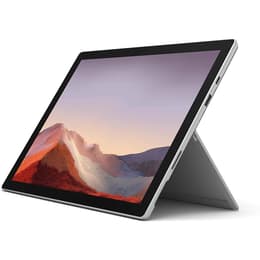
Microsoft Surface Pro 7+ 12"
Starting at

Refurbished price:A$469.00

Versus A$3,046.34 new

See options
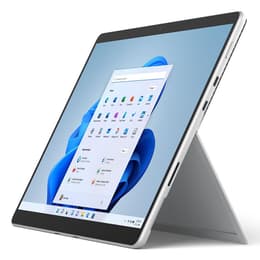
Microsoft Surface Pro 8 13"
Starting at

Refurbished price:A$625.00

Versus A$3,192.00 new

See options

Differences at a glance

The Microsoft Surface Pro 7+ (2021) and Microsoft Surface Pro 8 (2021) represent two distinct branches of portable 2-in-1 computing. While the Surface Pro 7+ retained the classic chassis design of its predecessors, the Surface Pro 8 introduced a modernized physical overhaul with a larger screen and updated port selection. Both devices run on the Windows operating system and balance tablet portability with laptop capability, though they differ significantly in everyday usability and exterior design.

Available Models

Storage (GB)

Processor

Memory (GB)

Scores

Durability

Both models share comparable internal generation foundations, but differ in their physical build longevity and support frameworks.

  • Software support timeline: Both units receive regular operating system updates and security patches, though the Surface Pro 8 benefits from a slightly later release window within the same hardware generation cycle.
  • Repairability and build: Both models feature removable solid-state drives that simplify data recovery and component servicing, while the Surface Pro 8 utilizes a sturdier aluminum enclosure compared to the magnesium alloy of the older generation.
  • Expected lifespan: Users can expect consistent daily productivity longevity from both devices, with hardware endurance largely depending on battery cycle health over years of routine mobile use.

Release year

2021

2021

Operating system

Windows 11

Windows 11

Performance

Handling daily computing tasks smoothly, these devices offer similar core processing speeds while diverging in memory bandwidth management and thermal thresholds.

  • Multitasking and app execution: Both options manage office productivity suites, browser-heavy research sessions, and standard streaming applications reliably without noticeable stutter.
  • Storage and memory configurations: Available storage spans various solid-state capacities paired with flexible RAM tiers, allowing users to select configurations matching heavy multi-app workflows.
  • Power management: Energy efficiency handles standard work days well under moderate loads, though intensive processing tasks will draw down the battery reserves at a faster rate on both machines.

Graphic card

Integrated Graphics

Integrated Graphics

Screen quality

Visual output differs noticeably in physical dimensions, refresh rates, and bezel architecture between the two models.

  • Display technology and size: The Surface Pro 7+ features a 12.3-inch traditional screen, whereas the Surface Pro 8 steps up to a larger 13-inch panel with narrower borders and a 3:2 aspect ratio.
  • Motion smoothness: The Surface Pro 8 introduces a higher refresh rate option that makes scrolling through documents and drawing with digital styluses feel more fluid.
  • Outdoor visibility: Both screens offer high pixel density and strong maximum brightness levels, ensuring text remains sharp and legible under varying indoor and outdoor lighting environments.

Resolution

2736 x 1824

2256 x 1504

Screen type

IPS

LED

Audiovisual

Multimedia capabilities cater well to remote communication, casual photography, and media consumption.

  • Video conferencing quality: Both devices feature high-definition front-facing cameras equipped with facial recognition sensors for secure login and clear video calls.
  • Rear camera performance: The back-facing camera captures clear document scans and snapshots, with the newer model adding support for higher-resolution video recording.
  • Audio output: Integrated stereo speakers supported by spatial audio formatting deliver balanced sound clarity for virtual meetings, movies, and casual music listening.

Miscellaneous

Physical connectivity and peripheral compatibility set the two devices apart during everyday desk setups.

  • Port selection: The Surface Pro 7+ retains a traditional rectangular USB port alongside a single versatile connector, while the Surface Pro 8 transitions entirely to modern high-speed universal ports.
  • Physical dimensions: The Surface Pro 8 carries a slightly heavier and larger footprint to accommodate its expanded screen real estate.
  • Accessory integration: Both models support detachable keyboards and active pens, though the newer model provides an integrated charging garage for updated stylus accessories.

Weight

770 oz

2500 oz

Screen size

12

13

What the community thinks

User feedback from online communities highlights distinct preferences for each device based on workflow habits. Owners of the Surface Pro 7+ frequently praise its retention of legacy connection ports, such as traditional USB slots, which eliminate the immediate need for external adapters. Conversely, users often favor the Surface Pro 8 for its modernized aesthetic, expansive screen space, and smoother visual refresh rate during note-taking and media viewing.

Users prioritizing traditional port versatility and a lighter, classic footprint may find the Surface Pro 7+ well-suited to their daily routine. Meanwhile, users prioritizing a more immersive display, modern high-speed connectivity, and updated physical design will likely lean toward the Surface Pro 8. Exploring a quality-assured refurbished option provides a sustainable choice for acquiring either device while minimizing environmental impact.

Our recent comparisons