Compare models
HP EliteBook 830 G7 13" vs Microsoft Surface Pro 7+ 12"
- 1-year warranty
- Free standard shipping
- Free 30-day returns
Differences at a glance
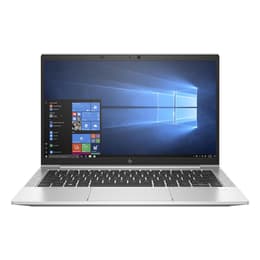
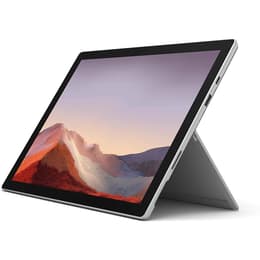
The HP EliteBook 830 G7 (2020) and the Microsoft Surface Pro 7+ (2021) represent portable productivity devices designed for professionals, students, and travelers. While the HP EliteBook follows a traditional clamshell laptop design with a 13-inch screen, the Microsoft Surface Pro functions as a versatile 12-inch detachable 2-in-1 device that transitions between a tablet and a laptop.
Both run on the Windows operating system and deliver robust administrative utility, though their distinct physical form factors cater to different daily workflows.
Scores
Durability
Both devices offer strong long-term usability backed by steady operating system support and durable manufacturing standards.
- Release timeline and OS support: Released in late 2020 and early 2021 respectively, both models receive regular software and security updates through the Windows ecosystem to ensure long-term operational viability.
- Repairability and build: The HP EliteBook features a traditional serviceable clamshell design with a sturdy aluminum chassis, while the Microsoft Surface Pro relies on a compact, sealed tablet build where internal components are more challenging to access.
- Expected lifespan: Solid-state storage and robust processing architectures in both models ensure they remain dependable everyday companions for several years of sustained professional or academic use.
Release year
2019
2021
Operating system
Windows 11
Windows 11
Performance
Performance capabilities across both models handle multitasking, office applications, and web browsing smoothly thanks to capable internal hardware configurations.
- Multitasking and responsiveness: Both devices switch effortlessly between multiple web browser tabs, document editors, and communication software without noticeable stutter or lag.
- Storage and memory configurations: Available variants offer diverse solid-state drive capacities and random access memory configurations to accommodate varied local file storage needs.
- Battery behavior: Both models provide sufficient battery longevity to sustain typical work sessions away from a power outlet, though heavy application use may require an earlier recharge.
Graphic card
Integrated Graphics
Integrated Graphics
Screen quality
Display characteristics differ significantly in physical dimensions and interaction style, impacting how users consume media and view content.
- Display technology and resolution: The HP EliteBook utilizes a standard 13.3-inch horizontal screen, while the Microsoft Surface Pro features a 12.3-inch touch-enabled panel with a taller 3:2 aspect ratio suited for document viewing.
- Brightness and outdoor visibility: Both screens offer clear visibility under indoor office lighting, with adjustable brightness levels to manage moderate outdoor or bright workspace environments.
- Interaction experience: The Surface Pro display supports direct touch input and digital pen accessories, whereas the EliteBook focuses on a traditional non-touch or optional touch clamshell viewing surface.
Resolution
1920 x 1080
2736 x 1824
Screen type
IPS
IPS
Audiovisual
Media consumption and communication features are tailored for remote meetings, video calls, and everyday multimedia playback.
- Video call hardware: Both models include integrated front-facing web cameras and microphone systems optimized for virtual meetings, online lectures, and video conferences.
- Audio output: Built-in stereo speakers deliver clear sound quality suitable for voice communication, casual video viewing, and background music playback.
- Secondary capture: The Surface Pro includes a rear-facing camera for quick document scanning or snapshots, a feature omitted in the traditional laptop design of the EliteBook.
Miscellaneous
Physical design elements, port selections, and handling characteristics dictate how easily each device travels and connects to accessories.
- Port selection: The HP EliteBook provides a traditional array of connections including standard USB ports and HDMI outputs, while the Surface Pro relies on a streamlined profile featuring USB-C and a proprietary magnetic charging port.
- Dimensions and weight: The EliteBook offers a familiar hinged laptop form factor with an integrated physical keyboard, whereas the Surface Pro functions as a lightweight tablet that requires a detachable keyboard cover for traditional typing.
- Security and sensors: Both devices incorporate modern authentication sensors, such as facial recognition or fingerprint readers, to facilitate quick and secure user sign-in.
Weight
1240 oz
770 oz
Screen size
13
12
What the community thinks
User discussions across online communities frequently highlight the HP EliteBook for its comfortable mechanical keyboard, robust port selection, and reliable traditional laptop ergonomics. Conversely, users often praise the Microsoft Surface Pro for its ultra-portable footprint, vibrant touch display, and flexible tablet versatility during travel or presentations.
Users prioritizing a traditional lap-friendly typing experience and built-in ports may prefer the HP EliteBook, while users who value a lightweight detachable design with touch and pen support often lean toward the Microsoft Surface Pro. Exploring a quality-assured refurbished option provides a sustainable choice for acquiring either device without compromising on performance or reliability. Ultimately, the choice depends on whether a classic clamshell laptop or a versatile tablet form factor better complements daily working habits.