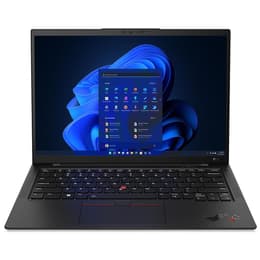
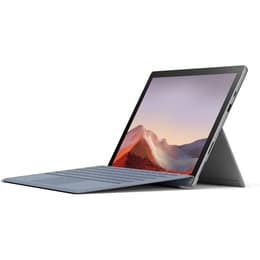

Lenovo ThinkPad X1 Carbon G10 14" vs Microsoft Surface Pro 7 12"

Lenovo ThinkPad X1 Carbon G10 14"
Starting at

Refurbished price:A$839.00

Versus A$4,218.00 new

See options
Microsoft Surface Pro 7 12"
Starting at

Refurbished price:A$398.00

Versus A$1,680.00 new

See options

The Lenovo ThinkPad X1 Carbon Gen 10, released in 2022, is a premium business ultrabook designed for traditional laptop use. In contrast, the Microsoft Surface Pro 7, launched in late 2019, is a versatile 2-in-1 detachable tablet that offers both laptop and tablet functionalities. While both devices operate on the Windows platform, providing a familiar software experience, their fundamental form factors and primary interaction methods represent their core differentiators.

Scores

Durability

Evaluating the practical lifespan of these devices involves considering their release timelines, software support, and physical resilience.

  • Release Timeline: The ThinkPad X1 Carbon Gen 10 is a more recent device, released in 2022, giving it a longer potential window for software updates and hardware relevance compared to the Surface Pro 7, which debuted in 2019. [4, 13]
  • Software Longevity: Both devices run Windows, benefiting from Microsoft's ongoing operating system support and security updates. The newer release of the X1 Carbon Gen 10 means it will likely receive feature updates for a longer duration.
  • Physical Durability & Repairability: The ThinkPad X1 Carbon Gen 10 is known for its robust construction, often featuring carbon fibre and magnesium alloys, and is subjected to MIL-STD 810H testing for resilience. [7, 37] Its design generally allows for easier component access, though RAM is typically soldered. The Surface Pro 7, while featuring a magnesium unibody, received a low repairability score from iFixit (1 out of 10) due to heavily glued components like the display and battery, and soldered RAM and storage, making repairs challenging. [8, 30, 38, 40]

Release year

2022

2019

Last Os Compatibility

Yes

Yes

Operating system

Windows 11

Windows 11

Performance

The performance capabilities of these two devices reflect their respective generations and design philosophies.

  • Processing Power: The ThinkPad X1 Carbon Gen 10 incorporates a more recent generation of processors, enabling it to handle demanding applications, complex multitasking, and intensive computational tasks with greater efficiency and responsiveness. Users can expect smoother operation across a wide range of professional and creative software. [7, 18]
  • Multitasking and Responsiveness: With its advanced internal architecture and faster memory, the X1 Carbon Gen 10 provides a highly responsive user experience, allowing for seamless transitions between multiple open applications and browser tabs. [7, 22]
  • Everyday Use: The Surface Pro 7, featuring an earlier generation of processors, is well-suited for common daily activities such as web browsing, email, document creation, and media consumption. While capable for general productivity, it may exhibit limitations when faced with more resource-intensive workloads or extensive multitasking. [1, 35]

Memory (GB)

16 GB

8 GB

Processor

Core i5-1240P

Core i5 - Gen 10 (G4)

Graphic card

Integrated Graphics

Integrated Graphics

Screen quality

The visual experience offered by each device is a significant factor, differing in size, technology, and interactive features.

  • Display Size and Aspect Ratio: The ThinkPad X1 Carbon Gen 10 features a larger 14-inch display with a 16:10 aspect ratio, providing more vertical screen real estate for productivity tasks. [4, 7] The Surface Pro 7 has a 12.3-inch PixelSense display with a 3:2 aspect ratio, which is often preferred for document viewing and tablet-style interaction. [1, 24]
  • Resolution and Clarity: The X1 Carbon Gen 10 offers various high-resolution options, including 2.8K OLED and 4K IPS panels, delivering exceptional clarity, vibrant colours, and deep blacks. [4, 7, 22] The Surface Pro 7's display provides a sharp 2736 x 1824 resolution, resulting in crisp text and detailed images. [1, 25]
  • Brightness and Touch: Both devices offer good brightness levels, making them suitable for use in various lighting conditions. The Surface Pro 7's display is inherently a multi-touch screen with support for pen input, central to its 2-in-1 design. [1, 25] While the X1 Carbon Gen 10 offers touch-enabled display options, it is primarily designed for keyboard and trackpad interaction. [4, 33]

Resolution

1920 x 1080

1920 x 1280

Screen type

IPS

LED

Camera

Audiovisual

For communication and content capture, both devices integrate camera and audio systems tailored to their primary use cases.

  • Webcam and Video Conferencing: The ThinkPad X1 Carbon Gen 10 typically includes a Full HD (1080p) webcam, often with an infrared (IR) sensor for facial recognition and a physical privacy shutter, enhancing video call quality and security. [7, 17, 22] The Surface Pro 7 features a 5.0MP front-facing camera capable of 1080p video, also supporting Windows Hello facial authentication. [1, 24]
  • Microphone and Speakers: The X1 Carbon Gen 10 is equipped with a quad-microphone array and Dolby Voice technology, designed to capture clear audio and reduce background noise during calls. Its stereo speakers with Dolby Atmos provide an immersive audio experience. [17, 22] The Surface Pro 7 includes dual far-field Studio Mics and 1.6W stereo speakers with Dolby Audio, offering clear voice pickup and decent sound for media. [1, 24]
  • Rear Camera: The Surface Pro 7 also features an 8.0MP rear-facing autofocus camera with 1080p video recording, providing additional flexibility for capturing images or scanning documents in tablet mode. [1] The X1 Carbon Gen 10, as a traditional laptop, does not typically include a rear camera.

Miscellaneous

Beyond core performance and display, several practical elements contribute to the overall user experience and device utility.

  • Connectivity Options: The ThinkPad X1 Carbon Gen 10 offers a comprehensive selection of ports, including two Thunderbolt 4 (USB-C) ports, two USB-A 3.2 Gen 1 ports, and a full-size HDMI 2.0b port, providing extensive options for peripherals and external displays. [5, 6, 7] It also supports Wi-Fi 6E and optional 4G/5G for advanced wireless connectivity. [7, 17] The Surface Pro 7 includes one USB-C port (supporting USB 3.1 but not Thunderbolt), one USB-A port, a 3.5mm headphone jack, a microSDXC card reader, and a Surface Connect port. [1, 2, 9] It supports Wi-Fi 6 and Bluetooth 5.0. [1]
  • Portability and Build: The X1 Carbon Gen 10 is a lightweight laptop, starting at approximately 1.12 kg, making it highly portable for users on the go. [7, 18] The Surface Pro 7 is even lighter at around 775 grams (without its Type Cover), emphasising its tablet-first design. [2, 19]
  • Security and Input: The X1 Carbon Gen 10 features a fingerprint reader integrated into the power button and optional IR facial recognition. [4, 5] The Surface Pro 7 relies on Windows Hello facial recognition for secure login. [1, 24] The Surface Pro 7's versatility is enhanced by its optional Type Cover keyboard and Surface Pen, sold separately. [1, 19]

Weight

7500 oz

775 oz

Screen size

14

12

The Lenovo ThinkPad X1 Carbon Gen 10 and the Microsoft Surface Pro 7 cater to distinct user needs, each with its own set of strengths and considerations.

Users often praise the ThinkPad X1 Carbon Gen 10 for its robust and professional build quality, its industry-leading keyboard, and the wide array of display options, including high-resolution OLED panels. [4, 7, 37] However, some users have noted that its battery life, particularly with higher-end configurations, might not consistently meet a full day's demanding use. [27, 32, 36]

The Surface Pro 7 is frequently lauded for its exceptional portability, the flexibility of its 2-in-1 design, and its vibrant, high-resolution PixelSense display with touch and pen support. [3, 24, 25] Conversely, common criticisms include its relatively limited port selection (lacking Thunderbolt support), and some users have expressed disappointment with its real-world battery longevity, which can be shorter than expected. [12, 28, 34]

For individuals prioritising a traditional laptop experience with a focus on robust build, extensive connectivity, and strong performance for demanding productivity tasks, the Lenovo ThinkPad X1 Carbon Gen 10 is a well-suited option. Its larger screen and comprehensive port selection align with a workstation-like environment. Conversely, users who value extreme portability, the versatility of a tablet with full Windows functionality, and intuitive touch and pen input for creative or note-taking purposes may find the Microsoft Surface Pro 7 to be a more appropriate choice. Its lightweight design and detachable keyboard make it ideal for mobile professionals or students. Both devices, whether new or as a quality-assured refurbished option, offer a pathway to a productive computing experience.

See all articles

Our recent comparisons