
Compare models

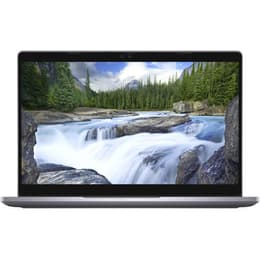
Dell Latitude 5310 13" vs Microsoft Surface Pro 8 13"

  • 1-year warranty
  • Free standard shipping
  • Free 30-day returns
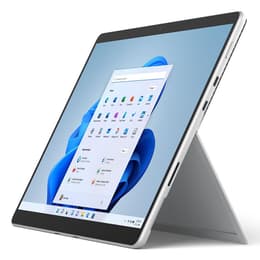
Microsoft Surface Pro 8 13"
Starting at

Refurbished price:A$625.00

Versus A$3,192.00 new

See options

Differences at a glance

The Dell Latitude 5310 (2020) and the Microsoft Surface Pro 8 (2021) represent two distinct approaches to 13-inch portable computing. While the Dell model functions as a traditional clamshell business laptop, the Microsoft device utilizes a versatile 2-in-1 detachable tablet form factor. Both run on the Windows operating system, offering familiar productivity environments housed in completely different physical designs.

Available Models

Storage (GB)

Processor

Memory (GB)

Scores

Durability

When examining hardware longevity and build durability, these devices cater to slightly different maintenance expectations and structural designs.

  • Release timeline and support: Released a year apart, both systems receive regular security patches and system updates from Microsoft, though their total active support window varies based on initial launch years.
  • Repairability and maintenance: The traditional laptop chassis of the Dell model allows for more straightforward internal component access and memory upgrades, whereas the sealed tablet body of the Microsoft alternative presents a more complex structure for hardware servicing.
  • Expected practical lifespan: Both units provide solid structural frames built to endure daily transit, with expected operational lifespans that benefit significantly from choosing a quality-assured refurbished option.

Release year

2020

2021

Last Os Compatibility

Yes

Yes

Operating system

Windows 11

Windows 11

Performance

System responsiveness and everyday utility vary depending on hardware generations and thermal layouts within each compact frame.

  • Multitasking and daily tasks: Both models handle standard web browsing, office suites, and document management efficiently, though newer internal architecture in the Microsoft device yields faster application launch speeds.
  • Storage and memory handling: Configurations include reliable solid-state drive storage options paired with varying random access memory capacities to support smooth switching between active software programs.
  • Battery behavior: Typical use cases reveal standard daily battery endurance for office work, with more intensive processing tasks reducing time away from a power outlet on both machines.

Graphic card

Integrated Graphics

Integrated Graphics

Screen quality

Visual workspace presentation differs significantly between the conventional widescreen display and the taller touch-enabled panel.

  • Display technology: The Dell features a standard liquid crystal display panel geared towards traditional office viewing, while the Microsoft unit employs a high-resolution touch-sensitive screen with a taller aspect ratio suited for document viewing.
  • Refresh rate and motion: The Microsoft model supports an increased refresh rate option for smoother scrolling and pen input tracking, whereas the Dell operates at a standard fixed refresh rate.
  • Outdoor visibility: Both screens offer adequate brightness levels for indoor environments, though direct sunlight usage requires manual adjustments to backlight settings on each device.

Resolution

1920 x 1080

2256 x 1504

Screen type

IPS

LED

Camera

Audiovisual

Multimedia capabilities, audio output, and remote communication tools reflect the distinct form factors of each computing device.

  • Video conferencing tools: The Microsoft device incorporates higher-resolution front and rear camera sensors suited for scanning documents and video calls, compared to the standard webcam integrated into the Dell top bezel.
  • Microphone clarity: Integrated studio-grade microphones on the Microsoft model capture voice cleanly for virtual meetings, matching the competent directional audio pickup found on the business notebook.
  • Speaker output: Built-in stereo speakers on both systems deliver clear audio adequate for casual media consumption and voice communication without requiring external headphones.

Miscellaneous

Physical dimensions, port selections, and peripheral compatibility define how each machine integrates into a mobile workspace.

  • Port variety: The Dell includes a traditional array of legacy connections alongside modern USB-C ports, while the Microsoft unit relies primarily on high-speed versatile ports alongside its magnetic charging connector.
  • Handling and dimensions: The Dell functions as a rigid clamshell laptop with an integrated keyboard, whereas the Microsoft alternative operates as a lightweight tablet that pairs with a detachable fabric keyboard cover.
  • Security sensors: Both devices offer optional biometric login features, including facial recognition capabilities and fingerprint readers depending on the specific configuration chosen.

Weight

7500 oz

2500 oz

Screen size

13

13

What the community thinks

User feedback from online communities highlights distinct preferences for each device depending on daily workflow habits. Owners of the Dell Latitude frequently praise its comfortable typing keyboard, dependable physical port selection, and straightforward durability for traditional desk work. Common discussions note that its heavier clamshell build feels stable during transit. Conversely, Surface Pro 8 users frequently highlight the convenience of the lightweight detachable tablet design, high-resolution touch display, and flexibility for digital note-taking. Frequent observations mention that using the device on an actual lap requires some adjustment compared to a rigid laptop base.

Users prioritizing a traditional laptop experience with extensive physical ports and a sturdy hinge will find the Dell well-suited to their needs. Meanwhile, users prioritizing a portable tablet format, touchscreen input, and pen compatibility may lean toward the Microsoft device. Choosing an eco-friendly alternative like a quality-assured refurbished option provides a sustainable path to acquiring either system without compromising on performance or reliability.

Our recent comparisons