Compare models

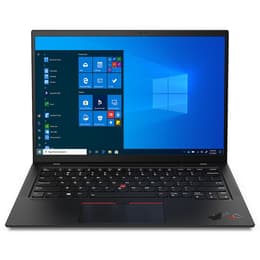
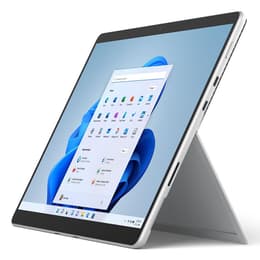
Lenovo ThinkPad X1 Carbon G9 14" vs Microsoft Surface Pro 8 13"

  • 1-year warranty
  • Free standard shipping
  • Free 30-day returns
Lenovo ThinkPad X1 Carbon G9 14"
Starting at

Refurbished price:A$675.00

Versus A$4,032.00 new

See options
Microsoft Surface Pro 8 13"
Starting at

Refurbished price:A$834.20

Versus A$2,449.00 new

See options

Differences at a glance

The Lenovo ThinkPad X1 Carbon G9 (2021) and the Microsoft Surface Pro 8 (2021) represent two distinct approaches to portable computing, balancing traditional clamshell design with a flexible detachable format. While both devices deliver robust everyday productivity and run on Windows operating systems, they differ significantly in form factor, input methods, and physical configuration. Choosing between them depends on whether a classic lapable keyboard layout or a versatile tablet-first design aligns better with daily routines.

Available Models

Storage

Processor

Memory

Scores

Durability

Both models share a similar release era and receive standard Windows operating system updates, but their structural designs influence long-term usability and repair outcomes differently.

    Software and Support: Both devices handle modern operating system requirements smoothly, though longevity depends heavily on individual battery health over years of charging cycles.
    Build and Repairs: The ThinkPad features a traditional clamshell chassis with accessible internal components for professional maintenance, whereas the Surface Pro uses a sealed tablet body that requires specialized care for component replacements.
    Expected Lifespan: Users can anticipate reliable multi-year performance from both models for standard office tasks and web browsing, provided the hardware is handled with normal day-to-day care.

Release year

2020

2021

Last Os Compatibility

Yes

Yes

Operating system

Windows 11

Windows 11

Performance

Equipped with similar internal processing families and configurable RAM options, both machines handle multitasking, document editing, and browser-heavy workflows with dependable speed.

    Multitasking and Responsiveness: Configured with ample memory, both devices switch between demanding applications and heavy browser tabs without noticeable lag or stutter.
    Battery Behavior: The traditional laptop chassis accommodates a larger battery capacity that typically sustains a full workday of mixed office use, while the compact tablet format may require an opportunistic midday charge during heavy workloads.
    Storage Options: Both models offer fast solid-state drive configurations that ensure rapid file transfers and quick system boot times.

Graphic card

Integrated Graphics

Integrated Graphics

Screen quality

Display configurations cater to different viewing preferences, contrasting a traditional widescreen laptop panel with an expansive, taller touchscreen tablet screen.

    Panel Technology and Resolution: The ThinkPad offers a sharp 14-inch widescreen display with an efficient aspect ratio for documents, while the Surface Pro features a vibrant 13-inch higher-resolution touchscreen designed for versatile viewing.
    Refresh Rate and Smoothness: The Surface Pro introduces a high refresh rate option that makes scrolling and digital pen movements exceptionally fluid, whereas the ThinkPad maintains a standard refresh rate suited for traditional office tasks.
    Outdoor Usability: Both screens reach sufficient brightness levels to remain legible under typical indoor lighting and shaded outdoor environments.

Resolution

1920 x 1200

2880 x 1920

Screen type

IPS

IPS

Camera

Audiovisual

Multimedia capabilities reflect each device's intended physical orientation, emphasizing either traditional video conferencing or flexible capture options.

    Webcam and Video Calls: Both machines feature clear front-facing camera systems equipped for high-definition video meetings, supported by capable microphone arrays that isolate voice input effectively during calls.
    Photography and Rear Optics: The Surface Pro includes a high-resolution rear-facing camera useful for snapping quick document scans in tablet mode, a feature omitted on the traditional clamshell ThinkPad.
    Audio Output: Built-in stereo speakers on both devices deliver clear dialogue and adequate volume for casual media consumption and virtual meetings.

Miscellaneous

Physical connectivity and portability factors define how each device integrates into mobile workspaces and travel bags.

    Ports and Connectivity: The ThinkPad provides a wide array of built-in connections including traditional USB ports and HDMI alongside modern high-speed slots, while the Surface Pro relies primarily on versatile USB-C connections and a dedicated magnetic charging port.
    Portability and Weight: The Surface Pro offers a lighter standalone tablet body that becomes comparable in weight once its keyboard cover is attached, whereas the ThinkPad provides an integrated all-in-one ultra-thin frame.
    Security Features: Both models incorporate reliable biometric identification tools to streamline secure logins without requiring manual password entry.

Weight

1130 oz

891 oz

Screen size

14

13

What the community thinks

User feedback from online communities highlights distinct daily advantages for each platform. Owners of the Lenovo ThinkPad X1 Carbon G9 frequently praise its comfortable typing keyboard, comprehensive port selection, and reliable all-day battery life during travel. Conversely, Microsoft Surface Pro 8 users appreciate its crisp high-resolution touchscreen, fluid display motion, and the flexibility to detach the keyboard for reading or digital note-taking.

Users prioritizing a traditional lap-friendly keyboard and extensive built-in connectivity will find the ThinkPad well-suited to their workflow. Meanwhile, users prioritizing a lightweight tablet structure, touch-first navigation, and pen support may lean toward the Surface Pro. For buyers exploring sustainable alternatives, choosing a quality-assured refurbished option provides a reliable path to acquiring either device while supporting eco-friendly technology consumption.

Our recent comparisons