
Compare models

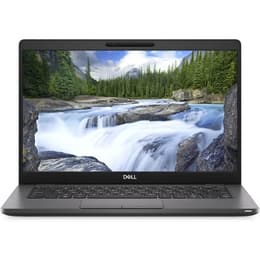
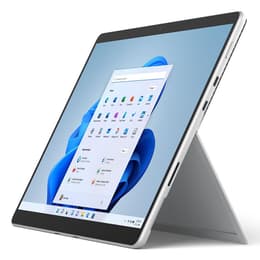
Dell Latitude 5300 13" vs Microsoft Surface Pro 8 13"

  • 1-year warranty
  • Free standard shipping
  • Free 30-day returns
Microsoft Surface Pro 8 13"
Starting at

Refurbished price:A$835.00

Versus A$3,192.00 new

See options

Differences at a glance

The Dell Latitude 5300 13" and the Microsoft Surface Pro 8 13" represent two distinct portable computer categories designed for productivity. While the Dell model follows a traditional clamshell notebook format tailored for enterprise reliability, the Microsoft device utilizes a versatile detachable tablet design with an integrated kickstand. Both run on the Windows operating system environment, though they cater to entirely different structural preferences and mobile workflows.

Available Models

Storage

Processor

Memory

Scores

Durability

When examining structural longevity and software support, both portable computers handle standard professional lifespans differently based on their release timelines and hardware design approaches.

  • Release timeline: The Dell Latitude 5300 launched earlier as a business-centric machine, whereas the Microsoft Surface Pro 8 arrived later with a more contemporary hardware platform.
  • Software updates: Both machines receive standard operating system security patches and feature updates from Microsoft, though newer internal architecture grants the Surface Pro 8 extended compatibility windows for future software iterations.
  • Repairability and lifespan: The Dell laptop features traditional modular components that allow straightforward internal access for maintenance, while the glued tablet chassis of the Surface Pro 8 requires specialized care for component swaps.

Release year

2019

2021

Last Os Compatibility

Yes

Yes

Operating system

Windows 11

Windows 11

Performance

Under everyday workloads, both devices deliver dependable responsiveness for multitasking, document editing, and web browsing, though they approach hardware configurations through separate lenses.

  • Storage and memory: Both models offer scalable solid-state drive storage options and varying memory tiers that handle multiple open browser tabs and office applications smoothly.
  • Processing capability: Everyday tasks like spreadsheet management and video streaming execute without noticeable stutter on both systems, though the Surface Pro 8 benefits from a generationally newer processor architecture for demanding background processes.
  • Battery behavior: The Dell model typically sustains standard office hours on a single charge, whereas the Surface Pro 8 offers variable endurance depending on screen brightness settings and whether external keyboards are attached.

Graphic card

Integrated Graphics

Integrated Graphics

Screen quality

Visual output differs significantly between the traditional matte laptop screen and the glossy high-resolution tablet panel.

  • Display technology: The Dell Latitude 5300 utilizes a standard 16:9 anti-glare screen designed to minimize reflections under harsh office lighting, while the Surface Pro 8 features a taller 3:2 pixel-dense touch panel optimized for vertical scrolling and digital inking.
  • Refresh rate and fluidity: The Surface Pro 8 supports higher refresh rate capabilities for smoother on-screen motion during pen input and rapid document scrolling, compared to the standard refresh rate on the Dell display.
  • Outdoor usability: Both screens reach sufficient brightness levels for indoor environments, though the matte finish on select Dell configurations manages direct glare more effectively than the glossy glass front of the Surface.

Resolution

1366 x 768

2256 x 1504

Screen type

IPS

LED

Camera

Audiovisual

Multimedia capabilities and conferencing features vary based on the physical form factor of each computer.

  • Camera systems: The Surface Pro 8 includes high-definition front and rear cameras equipped with facial recognition login support, whereas the Dell Latitude 5300 relies on a traditional webcam positioned above the screen.
  • Audio output: Stereo speakers on the Surface Pro 8 provide clear sound staging for virtual meetings and media consumption, matching the reliable audio delivery of the business-oriented Dell speakers.
  • Microphone clarity: Integrated array microphones on both machines capture voice input cleanly for video calls without requiring external headset hardware.

Miscellaneous

Physical design traits and port selections define how each device integrates into daily travel and workspace setups.

  • Connectivity ports: The Dell Latitude 5300 includes legacy ports like traditional USB Type-A slots and an HDMI output alongside USB Type-C, whereas the Surface Pro 8 relies strictly on modern USB Type-C ports and a magnetic charging connector.
  • Weight and handling: The standalone Surface tablet offers an exceptionally lightweight, compact footprint for travelers, while the Dell laptop provides a rigid attached keyboard base that rests comfortably on laps without requiring a kickstand.
  • Build materials: Both devices utilize durable outer chassis materials designed to withstand regular commuting and daily professional handling.

Weight

1330 oz

2500 oz

Screen size

13

13

What the community thinks

Users prioritizing a traditional laptop experience with physical keyboard rigidity, ample legacy port selection, and straightforward component maintenance often lean toward the Dell Latitude 5300. Conversely, users valuing a lightweight detachable tablet format with touch input versatility, high-refresh-rate viewing, and digital pen support frequently prefer the Microsoft Surface Pro 8. Reviewers and everyday owners commonly praise the Dell model for its robust enterprise durability and connection versatility, while noting its older processor generation. Meanwhile, users frequently highlight the Surface Pro 8 for its vibrant display and flexible form factor, alongside occasional observations regarding its reliance on external keyboard attachments for traditional laptop use. Choosing between these quality-assured refurbished options ultimately depends on whether a classic clamshell notebook or a flexible tablet design best aligns with daily mobile routines.


Our recent comparisons