
Compare models
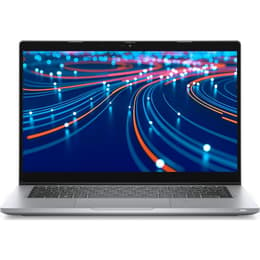
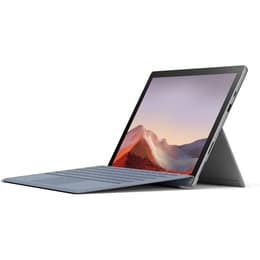
Dell Latitude 5320 13" vs Microsoft Surface Pro 7 12"
- 1-year warranty
- Free standard shipping
- Free 30-day returns
Differences at a glance
The Dell Latitude 5320 (2021) and the Microsoft Surface Pro 7 (2019) are versatile portable computers designed to handle daily productivity tasks, though they approach mobile computing from different hardware perspectives. While the Dell Latitude 5320 operates as a traditional clamshell laptop built for enterprise reliability, the Microsoft Surface Pro 7 functions as a detachable 2-in-1 tablet that emphasizes flexibility. Both devices run on the Windows operating system, ensuring broad software compatibility, yet their physical form factors and interface designs cater to distinct user lifestyles.
Available Models
Storage (GB)
Processor
Memory (GB)
Scores
Durability
When evaluating structural longevity and software support, both portable computers rely on standard Windows operating system lifecycles, though their physical designs present different maintenance considerations.
- Release timeline and hardware age: The Microsoft Surface Pro 7 debuted in 2019, whereas the Dell Latitude 5320 entered the market in 2021, providing a slightly younger hardware baseline for long-term use.
- Repairability and physical maintenance: The Dell Latitude 5320 features a traditional notebook chassis that allows straightforward internal access for component servicing, while the integrated tablet design of the Surface Pro 7 presents greater challenges for physical repairs.
- Expected practical lifespan: Both units handle routine administrative and web-based tasks reliably, but the newer release window of the Dell option supports extended daily utility before hardware obsolescence.
Release year
2021
2019
Last Os Compatibility
Yes
Yes
Operating system
Windows 11
Windows 11
Performance
Under everyday workloads, both systems utilize efficient processing configurations that manage multitasking, document editing, and web browsing smoothly.
- Storage configurations and speed: Both devices offer various solid-state drive capacities ranging from standard entry levels up to expansive configurations, ensuring quick file access and rapid system boot times.
- System responsiveness and multitasking: Current-generation internal processors and adequate memory allow both models to handle multiple browser tabs, office applications, and video conferencing software without noticeable lag.
- Battery behavior during standard use: The traditional laptop build of the Dell model accommodates a larger internal power cell for full-day office routines, while the compact tablet layout of the Surface device may require lighter usage patterns or midday charging during demanding tasks.
Graphic card
Integrated Graphics
Integrated Graphics
Screen quality
Visual output differs significantly in physical dimensions and interaction style, impacting how users consume media and review documents.
- Display technology and format: The Microsoft Surface Pro 7 utilizes a 12.3-inch touchscreen with an expressive 3:2 aspect ratio suited for vertical document viewing, whereas the Dell Latitude 5320 provides a traditional 13.3-inch widescreen layout.
- Clarity and resolution: The Surface display offers a higher pixel density for sharp text rendering, while the Dell screen provides ample workspace clarity for standard professional tasks at a traditional widescreen resolution.
- Brightness and outdoor usability: Both screens deliver adequate illumination levels for typical indoor office environments, though direct outdoor sunlight may require brightness adjustments on both displays.
Resolution
1920 x 1080
1920 x 1280
Screen type
LCD
LED
Camera
Audiovisual
Multimedia capabilities and audio output are tailored toward remote collaboration, virtual meetings, and casual media playback.
- Camera system functionality: Both computers include front-facing web cameras adequate for video conferencing, with the Surface series adding rear-facing photo capabilities typical of tablet form factors.
- Microphone and call clarity: Integrated dual microphone arrays on both devices successfully isolate voices from background ambient noise during virtual meetings.
- Speaker output quality: Built-in stereo speakers provide clear dialogue for voice calls and casual video streaming, though external headphones or speakers improve depth for immersive music listening.
Miscellaneous
Physical dimensions, weight distribution, and peripheral connectivity options define how easily each device transitions between stationary desks and mobile travel.
- Port selection and connectivity: The Dell Latitude 5320 provides an extensive array of physical connections including traditional USB ports, HDMI, and modern high-speed data slots, while the Surface Pro 7 relies on a streamlined layout featuring USB-C and a dedicated charging port.
- Weight and physical handling: The Surface Pro 7 offers exceptional portability as a lightweight standalone tablet, whereas the Dell Latitude 5320 functions as a balanced clamshell notebook that rests comfortably on traditional laps and desks.
- Wireless capabilities: Both models incorporate modern wireless standards and Bluetooth connectivity to ensure stable pairing with wireless accessories and high-speed networks.
Weight
1320 oz
775 oz
Screen size
13
12
What the community thinks
User discussions across community forums frequently highlight the Microsoft Surface Pro 7 for its remarkable portability, responsive touch interface, and flexibility as a digital notepad. At the same time, users often note that its reliance on a detachable keyboard attachment can feel less stable when working on uneven surfaces. Conversely, community feedback praises the Dell Latitude 5320 for its robust physical keyboard, comfortable typing ergonomics, and comprehensive port selection, though some users point out that its traditional laptop footprint takes up more space in small travel bags.
Users prioritizing hand-held writing flexibility, touch navigation, and a lightweight travel profile may prefer the Microsoft Surface Pro 7. Meanwhile, users prioritizing a rigid typing lap experience, extensive physical port integration, and traditional enterprise reliability will find the Dell Latitude 5320 well-suited to their workflow needs. Exploring a quality-assured refurbished option provides a sustainable choice that extends device longevity while supporting eco-friendly technology consumption. Ultimately, selecting between these two computers depends entirely on whether daily routines benefit more from a detachable tablet design or a conventional business notebook structure.