
Compare models

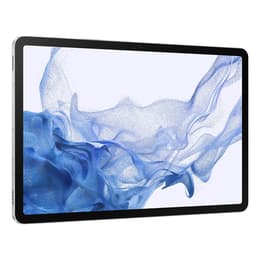
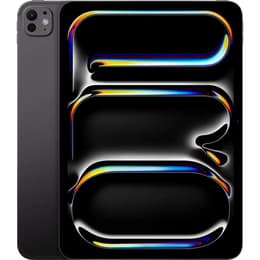
Galaxy Tab S8+ (12.4", 2022) vs iPad Pro (2025, M5 series)

  • 1-year warranty
  • Free standard shipping
  • Free 30-day returns

Differences at a glance

The Samsung Galaxy Tab S8+ (12.4", 2022) and the iPad Pro (2025, 13", M5 series) represent high-end large-format tablets designed for productivity, media consumption, and creative workflows. While both models offer expansive screen real estate and premium build quality, they operate on different software ecosystems and target distinct workflow preferences. Choosing between them involves evaluating how their operating systems, processing capabilities, and physical designs align with daily habits.

Scores

Durability

When examining longevity and hardware durability, both tablets offer robust construction designed to withstand regular portable use, though their software support timelines and maintenance profiles differ.

    Release timeline and software support: The iPad Pro benefits from a more recent release year and Apple's extended update lifecycle, while the Galaxy Tab S8+ has a head start in market age but provides a structured multi-year Android upgrade path.
    Build and repairability: Both devices feature sturdy aluminum backs and protective glass fronts, though professional repair options and structural resilience vary slightly depending on handling conditions and service availability.
    Expected practical lifespan: Both units maintain high processing overhead that prevents obsolescence during everyday tasks, ensuring years of reliable service for browsing, streaming, and document editing.

Release year

2022

2025

Compatible with latest Update

Yes

Yes

Operating system

Android

iPadOS

Performance

Performance capabilities vary significantly across these two machines, influencing how smoothly heavy tasks, multitasking layouts, and demanding applications run during intensive use sessions.

    Processor capabilities and responsiveness: The iPad Pro handles demanding creative tasks, advanced rendering, and heavy multitasking smoothly thanks to its current-generation processor, whereas the Galaxy Tab S8+ relies on a slightly older platform that still manages everyday apps, split-screen workflows, and casual gaming efficiently.
    Storage and memory configurations: Both tablets offer multiple tiers of internal storage and robust RAM allocations, though the Galaxy Tab S8+ uniquely includes expandable storage via a microSD card slot for local file archiving.
    Battery behavior: Both devices supply enough battery capacity to comfortably navigate a standard day of mixed productivity and media playback, adjusting energy consumption dynamically during lighter tasks.

Screen quality

Display technology defines a large part of the interactive experience on these large-format tablets, impacting clarity, color fidelity, and viewing comfort in varied lighting environments.

    Display technology and resolution: The Galaxy Tab S8+ features a vibrant Super AMOLED display with deep contrast levels, while the iPad Pro utilizes an advanced OLED panel that delivers exceptional brightness and precise color grading for visual media.
    Refresh rate and smoothness: Both models support smooth high refresh rate panels up to 120Hz, ensuring fluid scrolling, responsive pen input, and seamless animation transitions across the interface.
    Outdoor visibility: High peak brightness capabilities on both screens allow users to read documents and view media outdoors or under bright indoor lighting without excessive glare.

Resolution

1752 x 2800

2420 x 1668

Screen type

Super AMOLED

Ultra Retina XDR display

Audiovisual

While tablets are rarely primary cameras, their integrated optics and audio hardware play crucial roles in remote communication, scanning documents, and casual media recording.

    Camera systems: Both devices feature capable rear camera arrays and ultra-wide front-facing lenses positioned for landscape video calls, keeping users centered during online meetings.
    Video and audio output: Integrated multi-microphone arrays capture clear voice audio for calls, while quad-speaker setups deliver balanced stereo sound for movies, music, and virtual conferences.
    Low-light performance: Sensor hardware on both models adjusts well to indoor lighting conditions, reducing digital noise during video chats in dim rooms.

Miscellaneous

Practical day-to-day usability is shaped by connectivity standards, physical dimensions, and accessory compatibility that determine how easily each tablet integrates into travel gear.

    Connectivity and ports: Both models support fast wireless standards alongside high-speed USB-C ports for data transfer, external monitor connection, and charging accessories.
    Dimensions and handling: The Galaxy Tab S8+ maintains a slim and lightweight profile despite its expansive 12.4-inch footprint, while the iPad Pro balances a slightly larger 13-inch display within a remarkably thin chassis.
    Ecosystem integration: Each device is designed to synchronize seamlessly with its respective manufacturer's broader ecosystem of phones, laptops, and peripheral accessories.

Weight

567 oz

444 oz

Screen size (in)

12.4

11

Network

Wi-Fi

Wi-Fi

Carrier compatibility

Without SIM Port

Without SIM Port

What the community thinks

User feedback from online communities highlights distinct preferences for each device based on workflow habits. Owners of the Galaxy Tab S8+ frequently praise its flexible file management, expandable storage slot, and the inclusion of a responsive stylus in the box. Conversely, iPad Pro users frequently emphasize the raw processing power of the M5 series chip and the expansive, color-accurate display for professional creative applications. At the same time, some users note that mobile operating system limitations can occasionally restrict desktop-class workflows on both platforms.

Users prioritizing an open file system, expandable storage, and a bundled stylus may prefer the Galaxy Tab S8+, while users seeking raw processing longevity and advanced creative software environments often lean toward the iPad Pro. Choosing a quality-assured refurbished option provides a sustainable choice that extends device lifecycles while keeping environmental impact low. Ultimately, the right choice depends on which operating system environment best supports your daily routines.

Our recent comparisons