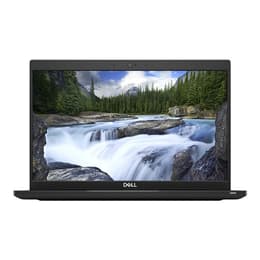
Dell Latitude 5520 15" vs Dell Latitude 7390 13"

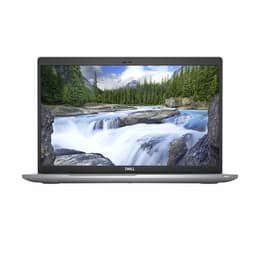
Dell Latitude 5520 15"
Starting at

Refurbished price:A$768.00

Versus A$1,200.00 new

See options
Dell Latitude 7390 13"
See options

The Dell Latitude 5520 15, released in 2021, and the Dell Latitude 7390 13, launched in 2018, are both business-oriented laptops designed for productivity. While both run on the Windows operating system and share the Latitude family's focus on reliability, their primary distinctions lie in their physical size, display characteristics, and the generation of their internal components. The 5520 offers a larger screen and more recent hardware, while the 7390 prioritizes portability.

Scores

Durability

When considering the practical lifespan of these laptops, several factors come into play, including their release timelines, operating system support, and ease of maintenance.

  • Release Timeline: The Latitude 5520, released in 2021, benefits from a more recent launch compared to the 7390, which debuted in 2018. This difference means the 5520 will likely receive official software and security updates for a longer period, extending its functional life.
  • OS Support: Both devices run Windows, ensuring a consistent update schedule from Microsoft. However, the newer 5520 is better positioned to support future Windows versions and features for a longer duration.
  • Repairability: The Latitude 5520 is designed with accessible internals, allowing for straightforward upgrades of components like RAM and storage. The Latitude 7390 also offers good access for SSD and Wi-Fi card replacement, though its RAM is typically soldered, limiting memory upgrades.

Release year

2021

2017

Last Os Compatibility

Yes

Yes

Operating system

Windows 11

Windows 11

Performance

The performance of these laptops is largely influenced by their respective hardware generations, impacting how they handle daily tasks and more demanding applications.

  • Processor Capabilities: The Latitude 5520 features more recent processors, which generally translate to improved efficiency and responsiveness for everyday computing, multitasking, and handling modern business applications. The Latitude 7390, with its earlier generation processors, still provides solid performance for general office work and web browsing, but may show limitations with intensive tasks.
  • Storage Options: Both models offer solid-state drive (SSD) storage, contributing to fast boot times and quick application loading. The 5520 supports newer NVMe SSDs, with some configurations offering PCIe Gen 4 speeds, providing faster data transfer rates.
  • Memory Configuration: The Latitude 5520 typically includes two SODIMM slots, allowing for memory upgrades up to 64GB, which is beneficial for users running numerous applications simultaneously or working with large datasets. The Latitude 7390's memory is often soldered, limiting expansion beyond its initial configuration, usually up to 16GB.
  • Battery Behavior: The 5520, with its larger battery options (up to 63Whr), can deliver extended usage, with some configurations offering around 14 hours of web browsing or 10 hours of video playback. The 7390, equipped with a 60Whr battery, also provides substantial battery life, often exceeding 9-10 hours for typical use.

Memory (GB)

16 GB

16 GB

Processor

Core i5-1145G7

Core i7 - Gen 8 (U)

Graphic card

Integrated Graphics

Integrated Graphics

Screen quality

The visual experience on these laptops differs primarily due to their screen size and display characteristics.

  • Display Size and Resolution: The Latitude 5520 features a larger 15.6-inch display, commonly available in Full HD (1920x1080) resolution, offering more screen real estate for multitasking and content viewing. The Latitude 7390 has a more compact 13.3-inch Full HD (1920x1080) display, which results in a higher pixel density for sharper images on a smaller screen.
  • Panel Technology and Brightness: Both models typically use IPS panels, providing wide viewing angles and good color reproduction. The 5520's brightness usually ranges from 250-275 nits, while the 7390 often offers similar brightness levels, around 286-307 nits. Both generally feature anti-glare finishes, which are beneficial for working in varied lighting conditions.
  • Viewing Experience: The larger display of the 5520 is well-suited for users who frequently work with multiple windows or require more visual information at once, such as spreadsheets or design work. The 7390's smaller screen enhances portability, making it ideal for users who prioritize a compact form factor for travel or frequent movement.

Resolution

1920 x 1080

1600 x 1200

Screen type

LCD

IPS

Camera

Audiovisual

For communication and media consumption, both Latitude models offer standard features for business use.

  • Webcam Quality: Both the Latitude 5520 and 7390 typically come with an HD webcam, suitable for video conferencing and online meetings. The 5520 often includes a privacy shutter for enhanced security and optional IR cameras for facial recognition. The 7390 also offers an optional IR camera for Windows Hello.
  • Microphone and Speakers: The 5520 features dual microphones, designed to improve audio clarity during calls. Its speakers provide decent sound quality, though some users note variations across the frequency spectrum. The 7390's speakers have been noted by some users as being less robust.
  • Video Recording: While not designed for high-end video production, both laptops are capable of standard video recording through their integrated webcams for communication purposes.

Miscellaneous

Beyond core performance and display, several practical elements differentiate these two Dell Latitude laptops.

  • Connectivity Options: The Latitude 5520 offers more modern connectivity, including two Thunderbolt 4 ports, which provide faster data transfer and versatile docking capabilities, alongside USB 3.2 Gen 1, HDMI, and RJ45 Ethernet. It also supports Wi-Fi 6 and optional LTE. The Latitude 7390 includes Thunderbolt 3, USB 3.0, HDMI, RJ45 Ethernet, and a Smart Card reader, with Wi-Fi 802.11 ac and optional LTE.
  • Portability and Build: The 7390 is significantly lighter, weighing between 1.13 kg and 1.3 kg, and more compact due to its 13.3-inch form factor, making it highly portable. It features a durable build with materials like magnesium alloy or carbon fiber and is MIL-STD 810G tested. The 5520, at around 1.59 kg, is heavier but still manageable for a 15.6-inch laptop, incorporating bioplastics in its construction for sustainability.
  • Security Features: Both models offer robust security, including optional fingerprint readers and IR cameras for facial recognition. The 7390 also features a Smart Card reader. The 5520 integrates a fingerprint reader into the power button.
  • Keyboard and Touchpad: The 5520 includes a full-sized keyboard with a dedicated numpad, which can be advantageous for data entry. The 7390 has a more compact keyboard, which some users find to have low travel.

Weight

1590 oz

1500 oz

Screen size

15

13

User feedback for the Dell Latitude 5520 15 often highlights its strong performance for business tasks, comfortable keyboard with a numpad, and good battery life, particularly with the larger battery option. Some users appreciate its modern connectivity, including Thunderbolt 4 ports. Criticisms sometimes point to the touchpad lacking dedicated buttons. For the Dell Latitude 7390 13, users frequently praise its exceptional portability, durable build, and vivid display. However, some users have noted its keyboard can feel cramped and its speakers may not offer the best audio experience.

Users prioritizing a larger screen for productivity, more recent internal components, and greater RAM upgradability will find the Dell Latitude 5520 15 well-suited to their needs. Its modern ports and Wi-Fi 6 support also make it a strong choice for a future-ready workstation. Conversely, individuals who value maximum portability, a compact design, and robust physical durability for frequent travel may lean towards the Dell Latitude 7390 13. Its smaller footprint and lighter weight make it an excellent companion for on-the-go professionals.

Both laptops offer reliable performance for their intended use cases, and choosing a quality-assured refurbished option for either model can provide an eco-friendly alternative for acquiring these business-grade devices.

See all articles

Our recent comparisons