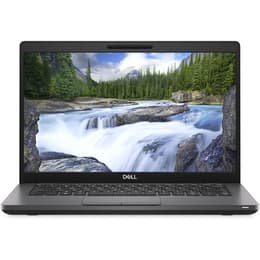
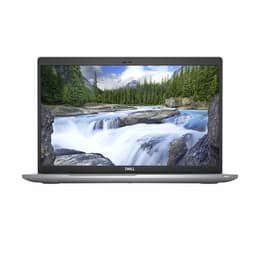
Dell Latitude 5400 14" vs Dell Latitude 5520 15"

Dell Latitude 5400 14"
See options
Dell Latitude 5520 15"
Starting at

Refurbished price:A$768.00

Versus A$1,200.00 new

See options

The Dell Latitude 5400 14 and the Dell Latitude 5520 15 are business-oriented laptops designed for productivity and reliability. Released in 2019 and 2021, respectively, these models offer distinct advantages in terms of display size, processing capabilities, and connectivity options. Both devices operate on the Windows platform, providing a familiar and consistent software experience for professional users.

Scores

Durability

The expected lifespan of a laptop is influenced by its release year, operating system support, and physical durability. These two Latitude models offer different timelines for software longevity and varying degrees of physical resilience.

  • Release Timeline: The Latitude 5400 was released in 2019, while the Latitude 5520 followed in 2021. This two-year difference means the 5520 benefits from a longer period of official software updates and security patches from its manufacturer and operating system provider.
  • OS Support & Updates: Both laptops are compatible with Windows 10 and can be upgraded to Windows 11, extending their usable software life. The newer 5520 will likely receive feature updates and security patches for a longer duration.
  • Durability & Repairability: The Latitude 5400 features a durable chassis, with some configurations incorporating post-industrial carbon fiber and MIL-STD 810G testing for resilience. The Latitude 5520 also emphasizes sustainability in its construction, utilizing bioplastics in its lid, and offers easy access to internal components for upgrades and maintenance.

Release year

2019

2021

Last Os Compatibility

Yes

Yes

Operating system

Windows 11

Windows 11

Performance

Performance in a business laptop is crucial for handling daily tasks efficiently, from document editing to complex data analysis. The core components of these two Latitude models provide different levels of responsiveness and capability.

  • Processing Power: The Latitude 5400 is equipped with 8th generation Intel Core processors, which capably handle everyday office applications and multitasking. The Latitude 5520, featuring 11th generation Intel Core processors, offers enhanced performance, particularly noticeable in more demanding applications and complex workflows, due to its newer architecture.
  • Memory and Storage: Both models support DDR4 RAM, with the 5400 configurable up to 32GB or 64GB, and the 5520 supporting up to 64GB, both across two SODIMM slots for upgradeability. Storage options include fast NVMe PCIe M.2 SSDs, with the 5520 offering two M.2 slots, one of which supports the faster PCIe Gen 4 standard, leading to quicker data access and application loading times.
  • Battery Behavior: The Latitude 5400, with its larger 68Wh battery option, can provide over 13 hours of use under typical web browsing conditions. The Latitude 5520, available with 42Wh or 63Wh batteries, typically offers between 8 to 14 hours of battery life, depending on configuration and usage patterns.

Memory (GB)

16 GB

16 GB

Processor

Core i7 - Gen 8 (U)

Core i5-1145G7

Graphic card

Integrated Graphics

Integrated Graphics

Screen quality

The display is a primary interface for user interaction, and differences in screen technology, size, and resolution can significantly impact the viewing experience and productivity.

  • Display Technology and Resolution: Both laptops offer Full HD (1920x1080) IPS anti-glare panels as common configurations, providing clear visuals and good viewing angles. The Latitude 5520 also has optional 4K UHD display configurations for users requiring higher pixel density.
  • Brightness and Clarity: The Latitude 5400's Full HD display typically offers around 220 nits of brightness, which is suitable for indoor use but can appear dim in bright environments. The Latitude 5520's Full HD IPS panels generally provide 250 nits, with some configurations reaching up to 400 nits, offering better visibility in varied lighting conditions.
  • Screen Size and Features: The Latitude 5400 features a 14-inch display, offering a balance between screen real estate and portability. The Latitude 5520 comes with a larger 15.6-inch display, which can enhance productivity for tasks requiring more screen space, and also includes a numeric keypad.

Resolution

1920 x 1080

1920 x 1080

Screen type

IPS

LCD

Camera

Audiovisual

For modern professional use, integrated audio and visual components are essential for effective communication and media consumption. Both Latitude models include features designed to support these needs.

  • Camera System: Both the Latitude 5400 and 5520 feature an HD webcam, suitable for video conferencing and online meetings. The Latitude 5520 often includes an IR webcam for facial recognition and a privacy shutter, enhancing security and user convenience. The 5400 also offers an optional IR camera and privacy shutter.
  • Microphone Quality: Both laptops incorporate built-in microphones designed for clear voice capture during calls and recordings.
  • Speaker Output: The Latitude 5520 includes dual 2W speakers, providing adequate audio for presentations and media consumption. User feedback for the 5520 suggests that while functional, the speakers may not offer the highest fidelity compared to some premium consumer devices.

Miscellaneous

Beyond core performance and display, various practical elements contribute to a laptop's overall utility and user experience, including connectivity, physical design, and security features.

  • Connectivity Options: The Latitude 5400 supports Wi-Fi 5 (802.11ac) and Bluetooth 5.0, with optional 4G LTE. The Latitude 5520 features newer standards, including Wi-Fi 6 and Bluetooth 5.1 or 5.2, along with optional LTE, offering faster wireless connections and improved efficiency.
  • Port Selection: The Latitude 5400 provides multiple USB 3.1 Gen 1 Type-A ports, a USB 3.1 Gen 2 Type-C port (with optional Thunderbolt 3), HDMI 1.4b, and an RJ-45 Ethernet port. The Latitude 5520 upgrades connectivity with two Thunderbolt 4 ports, two USB 3.2 Gen 1 Type-A ports, HDMI 2.0, and an RJ-45 Ethernet port, offering more versatile and faster peripheral connections.
  • Physical Design & Security: The Latitude 5400 weighs between 1.48 kg and 1.52 kg, making it a portable 14-inch option. The 15.6-inch Latitude 5520 is heavier, ranging from 1.59 kg to 1.82 kg. Both include security features like optional fingerprint readers and IR cameras for Windows Hello. The 5520 also uniquely features a numerical keypad.

Weight

7500 oz

1590 oz

Screen size

14

15

The Dell Latitude 5400 14 and Latitude 5520 15 cater to business users with differing priorities, reflecting their respective release years and design philosophies. Users frequently praise the Latitude 5400 for its robust build quality, comfortable keyboard, and impressive battery life, particularly with the higher capacity battery options. However, some users note that its display can be dim and its overall design less modern compared to newer models.

The Latitude 5520, being a newer model, receives commendation for its enhanced processing power, a wider array of modern ports including Thunderbolt 4, and the option for a larger 15.6-inch display with a numeric keypad. Users appreciate its improved wireless connectivity with Wi-Fi 6 and its overall performance for productivity and even light creative tasks. Some feedback indicates that the trackpad and speakers, while functional, might not be a highlight for all users, and fan noise can be present during intensive use.

Users prioritizing a highly portable and durable device for general office tasks and extended battery life may find the Latitude 5400 well-suited to their needs. Conversely, those who require more processing power for demanding applications, faster data transfer speeds, a larger screen for multitasking, and the latest wireless connectivity standards will likely lean towards the Latitude 5520. Both models offer a reliable computing experience, and choosing a quality-assured refurbished option can provide an eco-friendly alternative for either device.

See all articles

Our recent comparisons