Compare models
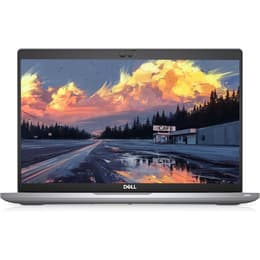
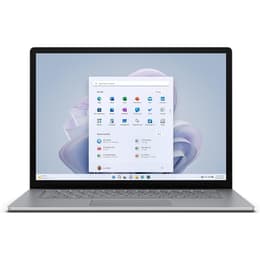
Dell Latitude 5420 14" vs Microsoft Surface Laptop 5 15"
- 1-year warranty
- Free standard shipping
- Free 30-day returns
Differences at a glance
The Dell Latitude 5420 (2021) and the Microsoft Surface Laptop 5 15" (2022) represent two distinct approaches to everyday computing, balancing business practicality with minimalist design. While the Dell laptop prioritizes modular configuration and enterprise connectivity, the Microsoft device focuses on a larger viewing canvas and a lightweight profile. Both run on the Windows operating system, providing a familiar software environment for general users.
Available Models
Storage
Processor
Memory
Scores
Durability
Evaluating the long-term potential of these machines involves looking at their release timelines, component accessibility, and ongoing software support schedules.
- Release Timeline and Software Support: Released in 2022, the Microsoft Surface Laptop 5 benefits from a slightly newer launch window than the 2021 Dell Latitude 5420, extending its window for manufacturer driver updates. Both models continue to receive standard operating system security patches.
- Repairability and Component Access: The Dell Latitude 5420 features a traditional enterprise build with easily replaceable internal parts and dual memory slots. Certain configurations of the Microsoft Surface Laptop 5 offer removable storage, though its sealed chassis requires careful handling during maintenance.
- Expected Lifespan: Both laptops deliver reliable multi-year operational life spans for routine productivity tasks, provided their batteries are maintained or serviced over time.
Release year
2020
2022
Last Os Compatibility
Yes
Yes
Operating system
Windows 11
Windows 11
Performance
Handling everyday tasks, office applications, and multitasking requires looking at how memory configuration and processing capability shape the user experience.
- Multitasking and Memory Options: The Dell Latitude 5420 supports user-upgradeable memory configurations, allowing individuals to expand capacity later. The Microsoft Surface Laptop 5 relies on soldered memory modules, meaning buyers should select their desired RAM capacity at the time of purchase.
- System Responsiveness: Both devices handle standard web browsing, document editing, and video streaming smoothly. Their processors manage everyday office workflows without noticeable stutter, though demanding creative software or intense workloads will push both systems to their thermal limits.
- Storage and Battery Behavior: Fast solid-state drive options ensure rapid boot times on both laptops. Typical battery endurance varies depending on workload intensity, with office-centric tasks lasting through standard work routines before requiring a recharge.
Graphic card
Integrated Graphics
Integrated Graphics
Screen quality
Visual workspace design differs significantly between the two models in terms of physical dimensions, panel aspect ratios, and clarity.
- Display Format and Resolution: The Microsoft Surface Laptop 5 15" offers a taller 3:2 aspect ratio on a larger screen, which provides extra vertical space for viewing documents and web pages simultaneously. The Dell Latitude 5420 utilizes a standard 14-inch widescreen 16:9 format suited for traditional video playback.
- Panel Technology and Touch Support: The Microsoft model comes equipped with a glossy, touch-responsive glass screen. The Dell alternative is widely available with anti-glare matte panel options that reduce reflections under harsh office lighting.
- Brightness and Outdoor Use: Maximum brightness levels on both machines handle indoor environments comfortably, though working directly under bright sunlight requires locating a shaded spot to maintain clear visibility.
Resolution
1920 x 1080
2496 x 1664
Audiovisual
Multimedia capabilities, video call hardware, and audio output vary in their execution across these two productivity machines.
- Webcam and Video Calls: Both laptops include integrated webcams and microphone arrays suitable for routine virtual meetings, remote learning sessions, and video calls with family or colleagues.
- Audio Output: The Microsoft Surface Laptop 5 incorporates spatial audio tuning through hidden speakers beneath the keyboard deck, producing clear sound for media consumption. The Dell Latitude 5420 delivers standard stereo sound output adequate for conference calls and casual listening.
- Microphone Clarity: Dual-microphone setups on both units help filter out minor background noise during voice communications, ensuring clear speech transmission.
Miscellaneous
Physical design choices, port availability, and peripheral connections dictate how easily each laptop integrates into an existing workspace.
- Port Selection: The Dell Latitude 5420 offers a wide array of physical connections, including traditional USB ports, an HDMI output, a network jack, and a microSD card reader without requiring adapters. The Microsoft Surface Laptop 5 features a streamlined port layout consisting of a single USB-C port with high-speed data transfer, a standard USB port, and a proprietary charging connection.
- Dimensions and Weight: The Microsoft Surface Laptop 5 15" maintains a remarkably slim profile for a large-screen device. The Dell Latitude 5420 is slightly thicker to accommodate its extensive built-in port selection.
- Security Features: Both models integrate hardware security modules, with various configurations offering biometric login options such as facial recognition cameras or fingerprint readers.
Weight
1370 oz
1265 oz
Screen size
14
15
What the community thinks
Choosing between the Dell Latitude 5420 and the Microsoft Surface Laptop 5 15" depends heavily on individual workflow preferences and daily port requirements. Users prioritizing a spacious touch screen with a taller aspect ratio for document viewing and a sleek profile may lean toward the Microsoft model. Conversely, users who value extensive port variety without dongles, anti-glare screen choices, and accessible internal hardware will find the Dell laptop well-suited to their needs.
Reviewers and everyday users often praise the Microsoft device for its premium aesthetic and keyboard comfort, while noting its limited port selection as a drawback. For the Dell alternative, community feedback highlights exceptional connectivity and practical durability as major strengths, though base screen brightness configurations receive mixed remarks. Opting for a quality-assured refurbished option provides an eco-friendly alternative that extends the operational life of these capable Windows machines while supporting sustainable technology choices.