
iPhone
Compare models
Differences at a glance
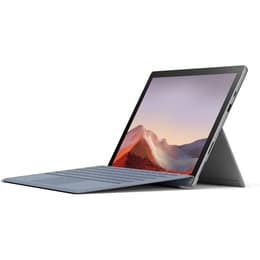
The Microsoft Surface Pro 6 and Surface Pro 7 are both versatile 2-in-1 devices, blending the functionality of a laptop with the portability of a tablet. Released in October 2018 and October 2019, respectively, these models share a familiar design while introducing key internal upgrades. The primary distinctions lie in their processing power and the inclusion of a modern USB-C port on the newer Surface Pro 7. Both devices operate on the Windows platform, offering a consistent software experience.
When considering the longevity of these devices, their release timelines and operating system support are important factors. The Surface Pro 6 was introduced in October 2018, followed by the Surface Pro 7 in October 2019. Both models initially shipped with Windows 10, which is scheduled to reach its end of support in October 2025 for most editions. While both are generally capable of upgrading to Windows 11, the Surface Pro 7, being a year newer, may benefit from a slightly extended period of compatibility with future software updates and security patches. In terms of physical durability and repairability, Surface devices are known for their robust build, featuring a magnesium alloy chassis, but they are not typically designed for easy user-level repairs. No significant differences in repairability have been noted between these two generations.
Release year
Last Os Compatibility
Operating system
The performance capabilities of the Surface Pro 6 and Surface Pro 7 show a notable generational improvement, primarily due to their updated internal components. The Surface Pro 6 is equipped with 8th-generation Intel Core processors, while the Surface Pro 7 features 10th-generation Intel Core processors. This upgrade in the Surface Pro 7 translates to a more responsive experience, particularly when handling demanding applications, complex multitasking, or light creative tasks. The Surface Pro 7 also introduced faster LPDDR4x RAM options, contributing to smoother operation. Both devices offer various solid-state drive (SSD) storage configurations, ranging from 128GB up to 1TB, providing ample space for applications and files. Battery performance, however, presents a more nuanced comparison; while the Surface Pro 7's processors are more power-efficient, some real-world usage reports suggest the Surface Pro 6 could offer comparable or even slightly better battery life in certain scenarios, partly due to differing testing methodologies in official specifications.
Graphic card
The display experience on both the Surface Pro 6 and Surface Pro 7 is largely consistent, as both devices feature the same high-quality screen technology. They each come with a 12.3-inch PixelSense display, offering a resolution of 2736 x 1824 pixels and a pixel density of 267 pixels per inch (PPI). This results in sharp, clear images and vibrant colors, suitable for a wide range of activities from productivity to media consumption. The 3:2 aspect ratio provides more vertical screen real estate compared to traditional widescreen displays, which can be beneficial for document editing and web browsing. Both displays support 10-point multi-touch and are compatible with the Surface Pen, offering a responsive and precise inking experience. Brightness levels are generally sufficient for indoor use, and while outdoor visibility is adequate, direct sunlight can still pose challenges.
Resolution
Screen type
The audio-visual capabilities of the Surface Pro 6 and Surface Pro 7 are quite similar, reflecting a consistent approach to camera and sound hardware across these generations. Both devices are equipped with an 8-megapixel rear-facing camera capable of 1080p Full HD video recording, and a 5-megapixel front-facing camera, also supporting 1080p HD video. This setup is well-suited for video conferencing, online classes, and casual photography. For audio, both models feature dual microphones, which contribute to clear voice capture during calls and recordings. They also include stereo speakers with Dolby Audio Premium, providing a satisfactory sound experience for media consumption and presentations. Neither device is designed to be a primary photography tool, but their integrated cameras and audio systems perform reliably for their intended use cases.
Beyond core performance and display, several practical elements differentiate the Surface Pro 6 and Surface Pro 7, particularly in terms of connectivity. The most significant change in the Surface Pro 7 is the inclusion of a USB-C 3.1 port, which replaces the Mini DisplayPort found on the Surface Pro 6. This addition provides more modern connectivity options for peripherals, external displays, and charging. Both devices retain a full-size USB-A port, a microSD card reader, a 3.5mm headphone jack, and the proprietary Surface Connect port for power and docking. In terms of wireless connectivity, the Surface Pro 7 supports Wi-Fi 6 and Bluetooth 5.0, offering faster and more stable connections compared to the Surface Pro 6's Wi-Fi 802.11ac and Bluetooth 4.1. Physically, both models are nearly identical in dimensions and weight, maintaining a compact and portable form factor with a built-in kickstand. Both also feature Windows Hello for secure facial recognition login.
Weight
Screen size
The Microsoft Surface Pro 6 and Surface Pro 7, while visually similar, offer distinct advantages that cater to different user needs. User feedback often highlights the Surface Pro 7's improved processing power as a significant benefit, making it more capable for demanding applications and a smoother overall experience. The addition of a USB-C port on the Surface Pro 7 is also frequently praised for its modern connectivity and versatility. Conversely, some users have noted that the Surface Pro 6, in certain configurations and usage patterns, can offer comparable or even slightly better real-world battery life, which is a common point of discussion in user forums. The consistent display quality across both models is generally well-received, providing a sharp and vibrant visual experience.
Users prioritizing modern connectivity, enhanced processing power for more intensive tasks, and a slightly longer window for software support may find the Surface Pro 7 to be a more suitable choice. This includes professionals who frequently use USB-C peripherals or students who run more resource-intensive applications. On the other hand, individuals with lighter computing needs, who value consistent battery performance, and do not require USB-C connectivity, might find the Surface Pro 6 to be a perfectly capable device. Both models represent a solid foundation for a portable Windows computing experience, and opting for a quality-assured refurbished option can be an eco-friendly alternative to extend the life of these devices.