Compare models

HP EliteBook 830 G7 13" vs Microsoft Surface Pro 7 12"

  • 1-year warranty
  • Free standard shipping
  • Free 30-day returns
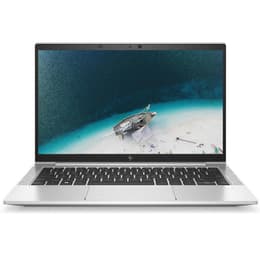
HP EliteBook 830 G7 13"
Starting at

Refurbished price:A$625.00

Versus A$900.00 new

See options
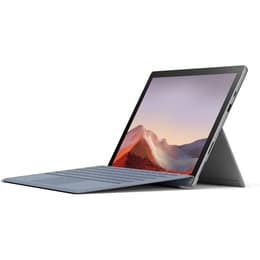
Microsoft Surface Pro 7 12"
Starting at

Refurbished price:A$406.00

Versus A$1,680.00 new

See options

Differences at a glance

The HP EliteBook 830 G7 (2020) and the Microsoft Surface Pro 7 (2019) represent two distinct approaches to portable productivity computing. While both run on the Windows operating system and utilize comparable generation processors, the HP EliteBook functions as a traditional clamshell laptop with a physical keyboard, whereas the Microsoft Surface Pro operates as a versatile detachable 2-in-1 tablet.

Available Models

Storage (GB)

Processor

Memory (GB)

Scores

Durability

Both machines feature generation-matched components with similar software lifespans, though their physical construction influences their long-term viability in different environments.

  • Software Support: Both devices support modern Windows operating systems with regular security patches and feature updates, ensuring consistent functionality for daily enterprise and personal workflows.
  • Repairability: The HP EliteBook offers a modular clamshell design that allows easier internal component access, whereas the sealed tablet body of the Surface Pro makes hardware maintenance and component replacement more challenging.
  • Expected Lifespan: Both systems deliver reliable multi-year operational life when selected as a quality-assured refurbished option, though the laptop design endures physical wear patterns differently than a detachable tablet format.

Release year

2020

2019

Operating system

Windows 11

Windows 11

Performance

System responsiveness and handling of daily workloads remain closely matched, as both machines rely on similar generation processing architecture and flexible memory configurations.

  • Multitasking Capability: Both models handle standard office applications, web browsing with numerous open tabs, and document editing smoothly when paired with adequate memory allocations.
  • Battery Behavior: The HP laptop generally sustains longer continuous usage away from an outlet during standard office tasks, while the compact tablet format requires more frequent charging under heavy workloads.
  • Storage and Loading: Fast solid-state storage options ensure rapid system boot times and quick application launching across both platforms.

Graphic card

Integrated Graphics

Integrated Graphics

Screen quality

Visual display characteristics differ primarily in aspect ratio and touch functionality, directly impacting media consumption and document viewing preferences.

  • Display Format: The Microsoft device utilizes a 3:2 aspect ratio touchscreen optimized for vertical document reading, while the HP laptop features a traditional 16:9 widescreen display suited for video playback.
  • Resolution and Clarity: Both screens offer sharp text rendering and vibrant color reproduction, ensuring clear readability during extended reading and writing sessions.
  • Surface Finish: The HP display features an anti-glare matte coating to minimize reflections in bright office spaces, whereas the Surface Pro uses a glossy glass finish that enhances touch sensitivity and color depth.

Resolution

1920 x 1080

1920 x 1280

Screen type

IPS

LED

Audiovisual

Media consumption, audio output, and video conferencing hardware vary to match each device's primary physical form factor.

  • Video Conferencing: Both models include integrated webcameras and microphone arrays suitable for virtual meetings, with the tablet offering front and rear-facing camera options.
  • Speaker Output: Integrated stereo speakers deliver clear dialogue for calls and casual media streaming, though neither system prioritizes room-filling bass output.
  • Input Versatility: The Surface Pro supports active stylus input directly on the screen for note-taking and sketching, a feature requiring external accessories or specific configurations on the traditional laptop.

Miscellaneous

Physical dimensions, weight distribution, and port selections define how each device integrates into mobile or stationary work setups.

  • Port Selection: The HP laptop includes traditional USB ports, HDMI output, and multiple USB-C connections without requiring dongles, whereas the Microsoft tablet relies primarily on a single USB-C port, a proprietary charging connection, and a headphone jack.
  • Physical Handling: The HP offers a rigid hinged laptop chassis with a built-in keyboard, while the Microsoft device provides a lightweight tablet body that requires an attachable keyboard cover and kickstand for desk work.
  • Connectivity: Both models incorporate modern wireless networking standards and Bluetooth technology for reliable peripheral pairing.

Weight

1230 oz

775 oz

Screen size

13

12

What the community thinks

User feedback on community forums highlights distinct preferences for each form factor. Owners of the HP EliteBook frequently praise its comfortable keyboard travel, robust port selection, and traditional lap-ability during travel. Conversely, Surface Pro users appreciate the exceptional screen clarity, lightweight portability, and versatility of transitioning between a tablet and a desktop workstation. Users prioritizing a traditional typing experience and built-in port variety may prefer the HP laptop, while users prioritizing drawing capabilities, touchscreen navigation, and maximum portability will lean toward the Microsoft tablet. Choosing a sustainable, quality-assured refurbished device allows consumers to access either productivity tool while supporting eco-friendly technology lifecycles.
Our recent comparisons