Compare models

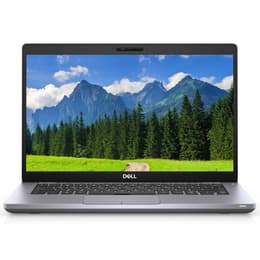
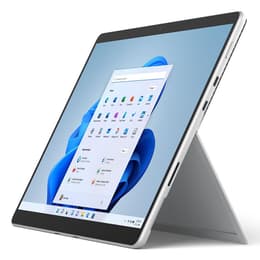
Dell Latitude 5410 14" vs Microsoft Surface Pro 8 13"

  • 1-year warranty
  • Free standard shipping
  • Free 30-day returns
Dell Latitude 5410 14"
Starting at

Refurbished price:A$322.00

Versus A$1,403.00 new

See options
Microsoft Surface Pro 8 13"
Starting at

Refurbished price:A$625.00

Versus A$3,192.00 new

See options

Differences at a glance

The Dell Latitude 5410 (2020) and the Microsoft Surface Pro 8 (2021) represent two distinct approaches to portable computing, combining traditional clamshell laptop design with a flexible 2-in-1 detachable form factor. While both run on Windows operating systems and target mobile productivity, they approach daily computing through fundamentally different hardware layouts.

Choosing between these devices involves balancing traditional laptop sturdiness against versatile, tablet-style portability.

Available Models

Storage (GB)

Processor

Memory (GB)

Scores

Durability

When evaluating structural longevity and software support, both machines offer reliable components designed to handle multi-year deployment in professional or academic environments.

  • Release timeline and hardware age: The Dell Latitude 5410 debuted in 2020, while the Microsoft Surface Pro 8 arrived in late 2021, giving the Surface model a slightly newer hardware baseline.
  • Software support and longevity: Both computers support Windows operating systems fully, ensuring standard security patching and feature updates for standard office and home usage scenarios.
  • Repairability and physical maintenance: The Dell laptop features standard service panels and accessible internal components, whereas the sealed tablet body of the Surface design presents more complex requirements for internal part replacements.

Release year

2018

2021

Last Os Compatibility

Yes

Yes

Operating system

Windows 11

Windows 11

Performance

Both systems handle standard daily multitasking, document editing, and web browsing smoothly, though their underlying processing platforms and thermal designs cater to different work styles.

  • Everyday multitasking and responsiveness: Applications open swiftly and web-based workflows run without interruption on both platforms, supported by fast solid-state storage options.
  • Memory configurations: Configurations range from standard entry-level tiers up to generous RAM capacities, allowing users to run numerous background browser tabs and productivity suites simultaneously.
  • Thermal behavior and sustained loads: The traditional clamshell chassis provides broader internal space for heat dissipation during extended work sessions, while the compact tablet layout manages sustained peak performance within tighter physical constraints.

Graphic card

Integrated Graphics

Integrated Graphics

Screen quality

Visual output differs notably due to the distinct screen ratios and physical form factors chosen by each manufacturer for their respective devices.

  • Display format and resolution: The Surface Pro 8 utilizes a higher-resolution touchscreen with a taller aspect ratio suited for document viewing, while the Latitude 5410 provides a standard widescreen matte display panel.
  • Refresh rate and interaction: The Surface display supports higher refresh rate capabilities for smoother visual scrolling and responsive digital pen input, contrasting with the standard refresh rate on the Dell screen.
  • Outdoor usability: Both screens reach adequate brightness levels for indoor environments, though anti-reflective treatments on traditional laptop screens help reduce glare under direct office lighting.

Resolution

1920 x 1080

2256 x 1504

Screen type

IPS

LED

Camera

Audiovisual

Media consumption and communication capabilities vary to match each device's primary structural design concept.

  • Video conferencing equipment: Both units include clear front-facing webcams and integrated microphone arrays designed to isolate background noise during virtual meetings.
  • Secondary optics: The Surface Pro 8 adds a rear-facing camera for quick document capture, a feature omitted on the traditional clamshell layout of the Latitude.
  • Audio output: Built-in stereo speakers deliver adequate sound clarity for conference calls and casual media streaming, though external headphones or speakers enhance bass response on both systems.

Miscellaneous

Physical connectivity options and peripheral support define how each machine integrates into stationary or mobile workspaces.

  • Port selection: The Latitude 5410 offers a comprehensive array of traditional USB-A ports, a dedicated network socket, and an HDMI output, whereas the Surface Pro 8 relies primarily on modern USB-C connections.
  • Physical dimensions and weight: The Surface configuration functions as a lightweight standalone tablet that attaches to an optional keyboard cover, while the Dell model provides an all-in-one hinged laptop footprint.
  • Wireless standards: Both models incorporate reliable Wi-Fi and Bluetooth protocols to maintain stable connections with wireless accessories and networks.

Weight

7500 oz

2500 oz

Screen size

14

13

What the community thinks

User discussions across community forums highlight distinct preferences depending on daily workflow requirements. Owners of the Dell Latitude 5410 frequently praise its dependable physical keyboard, extensive port variety, and sturdy build that feels right at home in traditional desk setups. Conversely, Surface Pro 8 users often emphasize the convenience of the detachable touchscreen, portability during travel, and the flexibility of digital inking features. Frequent criticisms for the laptop focus on its heavier footprint, while tablet users sometimes note that typing on a detachable cover requires a stable surface.

Users prioritizing a traditional lapable design, built-in ports, and straightforward physical durability will find the Dell Latitude 5410 well-suited to their needs. Meanwhile, users prioritizing maximum portability, touch interaction, and a versatile tablet form factor often lean toward the Microsoft Surface Pro 8. Choosing a quality-assured refurbished option provides a sustainable, eco-friendly alternative for acquiring either device while supporting more circular consumption habits.


Our recent comparisons