
Compare models
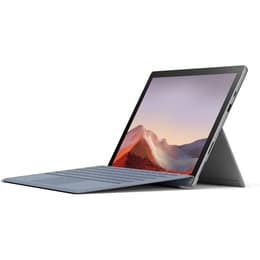
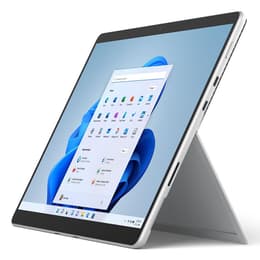
Microsoft Surface Pro 7 12" vs Microsoft Surface Pro 8 13"
- 1-year warranty
- Free standard shipping
- Free 30-day returns
Differences at a glance
The Microsoft Surface Pro 7 (2019) and the Microsoft Surface Pro 8 (2021) represent two generations of versatile 2-in-1 detachable devices designed for productivity, studying, and travel. While both models feature the signature kickstand design and run on Windows operating systems, the Surface Pro 8 introduces a redesigned chassis, a larger display with a higher refresh rate, and modern internal upgrades that differentiate it from its predecessor.
Available Models
Storage (GB)
Processor
Memory (GB)
Scores
Durability
When evaluating longevity, software support, and physical durability, both devices offer distinct timelines based on their release years and hardware standards.
- Release timeline and age: The Surface Pro 7 debuted in 2019, while the Surface Pro 8 launched in 2021, giving the newer model a two-year advantage in hardware age.
- Software longevity: Both devices support modern operating systems, though the newer model's extended update lifecycle aligns well with users seeking long-term system stability.
- Repairability and build: Both units feature sealed aluminum chassis that prioritize sleek form factors over user-serviceable internal components, making professional maintenance recommended for major repairs.
Release year
2019
2021
Last Os Compatibility
Yes
Yes
Operating system
Windows 11
Windows 11
Performance
Performance capabilities vary noticeably between these two generations, affecting multitasking, application loading speeds, and overall system responsiveness during demanding workflows.
- Processing capability: The Surface Pro 8 benefits from a generational leap in processing architecture, handling demanding multitasking, browser tabs, and productivity applications with increased efficiency compared to the Surface Pro 7.
- Memory and storage: Both models offer varied configurations of high-speed solid-state storage and memory capacities, though the newer generation provides better sustained performance under heavy workloads.
- Battery behavior: Real-world usage shows that the larger battery and power-efficient components in the Surface Pro 8 manage daily office tasks and streaming reliably, while the Surface Pro 7 requires more frequent charging during intensive tasks.
Graphic card
Integrated Graphics
Integrated Graphics
Screen quality
Display characteristics differ significantly in size, bezel design, and visual smoothness, impacting everyday media consumption and reading tasks.
- Display technology: The Surface Pro 7 features a 12.3-inch screen with traditional bezels, while the Surface Pro 8 upgrades to a 13-inch PixelSense Flow display with significantly slimmer borders and sharper resolution.
- Refresh rate and smoothness: The newer model introduces a higher refresh rate capability that makes scrolling through documents and pen-based drawing noticeably smoother than the standard refresh rate on the older model.
- Brightness and clarity: Both screens offer high pixel density and accurate color reproduction, but the Surface Pro 8 provides higher peak brightness levels that improve outdoor and bright-office visibility.
Resolution
1920 x 1280
2256 x 1504
Screen type
LED
LED
Camera
Audiovisual
Multimedia hardware, including cameras, microphones, and speakers, plays an essential role in remote communication and media consumption.
- Camera capabilities: Both devices feature front-facing and rear-facing cameras suitable for casual scanning and video conferencing, with the newer model incorporating improved sensor technology for clearer low-light video calls.
- Microphone and audio: Studio-grade microphone arrays on both models capture voice clearly during meetings, minimizing background noise effectively.
- Speaker output: Integrated stereo speakers with directional audio support provide adequate volume for casual media streaming and virtual meetings on both devices.
Miscellaneous
Practical physical features, port selection, and connectivity options dictate how easily each device integrates into existing accessory setups.
- Port selection: The Surface Pro 7 relies on a traditional USB-A port, a USB-C port, and the proprietary charging port, whereas the Surface Pro 8 replaces USB-A with dual Thunderbolt-enabled USB-C ports for faster peripheral connections.
- Wireless connectivity: Both models support modern Wi-Fi and Bluetooth standards, ensuring stable network connections in busy environments.
- Physical dimensions: The Surface Pro 8 is slightly heavier and fractionally thicker to accommodate the larger screen, though both remain highly portable options for travelers and mobile professionals.
Weight
775 oz
2500 oz
Screen size
12
13
What the community thinks
User feedback from online communities highlights distinct preferences for each generation. Owners of the Surface Pro 7 frequently praise its inclusion of a traditional USB-A port and its lightweight footprint, which suits users who prefer older accessories without adapters. Conversely, users often highlight the Surface Pro 8 for its modern screen proportions, smoother visual refresh rate, and improved thermal management during extended work sessions. Choosing a quality-assured refurbished option provides an eco-friendly way to access either of these capable computing devices.
Users prioritizing a traditional port layout and a lighter device for casual commuting may find the Surface Pro 7 well-suited to their routine. Meanwhile, users prioritizing a larger screen workspace, faster multitasking capabilities, and modern connection ports will likely lean toward the Surface Pro 8. Evaluating individual workflow requirements remains the most effective approach to selecting the right model.