Compare models
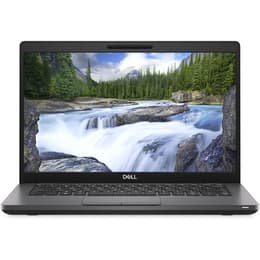
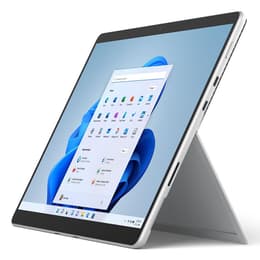
Dell Latitude 5400 14" vs Microsoft Surface Pro 8 13"
- 1-year warranty
- Free standard shipping
- Free 30-day returns
Differences at a glance
The Dell Latitude 5400 14" (2019) and Microsoft Surface Pro 8 13" (2021) represent two distinct approaches to portable computing, balancing traditional clamshell laptop utility with versatile tablet-first design. While both models run on Windows operating systems and cater to productivity tasks, they differ significantly in form factor, release generation, and physical versatility. This comparison examines how their practical differences influence daily use.
Available Models
Storage (GB)
Processor
Memory (GB)
Scores
Durability
When evaluating longevity and structural design, these two machines approach maintenance and update timelines differently based on their release years and hardware architecture.
- Release timeline and support: The Surface Pro 8 launched two years later than the Dell Latitude 5400, providing a more extended window for official software updates and firmware support.
- Repairability and access: The Dell laptop features a traditional clamshell chassis with accessible internal components and upgradeable memory slots, whereas the Microsoft tablet relies on a sealed profile where internal components require specialized service.
- Expected lifespan: Both devices handle daily workloads reliably, though the Dell model benefits from modular component replacement, while the Surface model offers newer underlying hardware generations.
Release year
2019
2021
Last Os Compatibility
Yes
Yes
Operating system
Windows 11
Windows 11
Performance
System responsiveness and everyday processing capabilities shape how smoothly each computer handles multitasking, browser loads, and general application usage.
- Multitasking capacity: Configurable RAM options on both systems allow users to run multiple office applications and web tabs simultaneously without major slowdowns.
- App loading and responsiveness: Solid-state storage ensures rapid boot times and snappy file transfers on both models, though the Surface Pro 8 benefits from a generational leap in internal processing architecture.
- Thermal behavior and battery: The Dell chassis provides steady thermal management for sustained workloads, while the compact tablet form factor of the Surface Pro 8 relies on efficient power management that requires more frequent replenishment during intensive tasks.
Graphic card
Integrated Graphics
Integrated Graphics
Screen quality
Visual workspace and display characteristics vary greatly between the traditional widescreen panel on the Dell and the high-resolution touchscreen on the Microsoft device.
- Display technology and resolution: The Surface Pro 8 utilizes a high-pixel-density touchscreen with a taller aspect ratio suited for document editing, while the Dell Latitude 5400 features a standard matte screen designed to minimize glare.
- Brightness and outdoor use: The Surface display achieves higher peak brightness levels for clear outdoor visibility, whereas the Dell panel requires shaded environments for optimal viewing.
- Refresh rate and smoothness: The Microsoft model supports an increased refresh rate option for smoother scrolling and pen input responsiveness, while the Dell operates at a standard refresh rate.
Resolution
1920 x 1080
2256 x 1504
Screen type
IPS
LED
Camera
Audiovisual
Multimedia hardware, including built-in optics and audio output, dictates the quality of virtual meetings and media consumption.
- Video conferencing optics: The Surface Pro 8 includes high-resolution front and rear cameras equipped with facial recognition login, while the Dell Latitude 5400 features a standard webcam suitable for basic video calls.
- Audio clarity: Integrated stereo speakers on the Microsoft device deliver immersive sound reproduction for media playback, whereas the Dell model provides standard audio output tailored for office communication.
- Microphone performance: Dual studio-grade microphones on the Surface Pro capture clearer voice audio during virtual meetings compared to the single microphone setup found on the older business laptop.
Miscellaneous
Physical dimensions, port availability, and peripheral connectivity define how easily each device integrates into various workspaces.
- Port selection: The Dell Latitude 5400 includes legacy connections like a full-sized Ethernet port, HDMI, and multiple USB-A slots alongside USB-C, whereas the Surface Pro 8 relies entirely on modern USB-C ports and a magnetic charging connector.
- Portability and weight: The Surface Pro 8 functions as a lightweight tablet that requires a separate keyboard cover for laptop use, while the Dell provides an all-in-one hinged clamshell design with a heavier physical footprint.
- Build materials: The Microsoft device utilizes an aluminum alloy chassis emphasizing a sleek profile, while the Dell employs a durable reinforced plastic composite built for rugged enterprise environments.
Weight
7500 oz
2500 oz
Screen size
14
13
What the community thinks
User feedback from online communities highlights distinct preferences for each device based on physical format and workflow requirements. Owners of the Dell Latitude 5400 frequently praise its robust selection of physical ports, reliable keyboard typing experience, and straightforward component accessibility. Common criticisms focus on its heavier weight and older generation hardware. Conversely, users of the Microsoft Surface Pro 8 appreciate its vibrant high-resolution touchscreen, exceptional portability, and versatile tablet conversion capabilities, though some note that finding a comfortable lap-typing position requires the attachable keyboard accessory.
Users prioritizing a traditional lap-friendly laptop with extensive built-in ports and straightforward mechanical durability will find the Dell Latitude 5400 well-suited to their needs. Meanwhile, users prioritizing a lightweight, pen-compatible touchscreen device for creative tasks or frequent travel may lean toward the Microsoft Surface Pro 8. Choosing between these machines depends on whether a classic clamshell notebook or a detachable tablet better fits daily routines. Exploring a quality-assured refurbished option provides an eco-friendly alternative that extends hardware life cycles while supporting sustainable technology choices.