
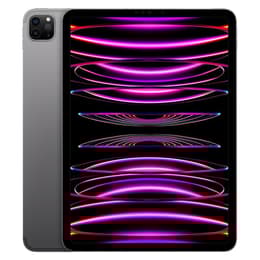

iPad 7 (2019, A10 series) vs iPad Pro (2022, M2 series)

iPad 7 (2019, A10 series)
Starting at

Refurbished price:A$174.00

Versus A$579.00 new

See options
iPad Pro (2022, M2 series)
Starting at

Refurbished price:A$1,071.71

Versus A$1,399.00 new

See options

Ratings

The iPad 2019, also known as the 7th generation iPad, and the iPad Pro 2022, available in 11-inch and 12.9-inch models, represent different tiers within Apple's tablet lineup. Both devices operate on iPadOS, offering a consistent software experience. However, they are distinguished by significant differences in processing power, display technology, and advanced feature sets, catering to varied user requirements.

Scores

Durability

The longevity of a tablet is influenced by its release date, software support, and physical resilience.

  • Release Timeline: The iPad 2019 was released in September 2019, while the iPad Pro 2022 launched in October 2022, creating a three-year gap in their development and component generations.
  • OS Support: The iPad 2019, powered by the A10 Fusion chip, shipped with iPadOS 13.1 and is upgradeable to iPadOS 17.x. It is anticipated that it may not receive future major iPadOS updates, such as iPadOS 19, due to hardware limitations. In contrast, the iPad Pro 2022, featuring the M2 chip, is expected to receive software updates for a considerably longer period, potentially 8 to 10 years from its release, ensuring extended access to new features and security enhancements.
  • Repairability: Both iPad models present challenges for repair due to the extensive use of strong adhesives in their construction. The iPad 2019 received a low repairability score, indicating that repairs can be difficult and may lead to further damage. While newer iPad Pro models have shown slight improvements in repairability, the overall design philosophy prioritizes thinness and rigidity, making internal access complex.
  • Practical Lifespan: Users commonly retain their iPads for several years, with many reporting usage of four to seven years or more. The iPad Pro 2022, with its more powerful processor and longer software support, offers a greater practical lifespan for demanding applications and future software compatibility.

Release year

2019

2022

Compatible with latest Update

Yes

Yes

Operating system

iPadOS

iPadOS

Minimum system requirements (iPadOS)

iPadOS 18

iPadOS 18

Performance

The performance capabilities of these two tablets vary significantly, impacting their suitability for different tasks.

  • Processor Capabilities: The iPad 2019 is equipped with the A10 Fusion chip, which capably handles everyday computing tasks. The iPad Pro 2022 features the M2 chip, a more advanced processor designed for high-performance computing.
  • Real-World Usage: For general use such as web browsing, email, and streaming media, the iPad 2019 provides a smooth experience. The iPad Pro 2022, however, delivers substantially faster performance, making it well-suited for intensive applications like professional video editing, 3D rendering, and complex graphic design. It also offers a more fluid experience for advanced multitasking and high-fidelity gaming.
  • Multitasking and RAM: The iPad 2019 includes 3GB of RAM, which is sufficient for basic multitasking. The iPad Pro 2022 comes with either 8GB or 16GB of RAM, depending on the storage configuration, allowing for more applications to run simultaneously without performance degradation and enhancing overall system responsiveness.
  • Storage Options: The iPad 2019 is available with 32GB or 128GB of internal storage. The iPad Pro 2022 offers a wider range of storage capacities, from 128GB up to 2TB, accommodating larger files and more applications.

Memory (GB)

3 GB

8 GB

Processor

Apple A10 Fusion

Apple M2

Screen quality

The visual experience on these tablets differs considerably due to advancements in display technology.

  • Display Technology: The iPad 2019 features a 10.2-inch Retina IPS LCD. The iPad Pro 2022 offers two display options: an 11-inch Liquid Retina IPS LCD or a 12.9-inch Liquid Retina XDR mini-LED display.
  • Resolution and Clarity: Both models maintain a pixel density of 264 pixels per inch (ppi), providing clear text and images.
  • Brightness Levels: The iPad 2019 has a maximum brightness of 500 nits. The iPad Pro 2022's 11-inch model reaches 600 nits, while the 12.9-inch Liquid Retina XDR display can achieve up to 1600 nits peak brightness for HDR content, offering superior visibility in bright environments and for high dynamic range media.
  • Refresh Rate and Smoothness: The iPad 2019 operates at a standard 60Hz refresh rate. The iPad Pro 2022 incorporates ProMotion technology, which provides an adaptive refresh rate up to 120Hz. This results in noticeably smoother scrolling, more fluid animations, and enhanced responsiveness during interactions.
  • Viewing Experience: The iPad Pro 2022, particularly the 12.9-inch model with its mini-LED technology, delivers a more vibrant and immersive viewing experience with deeper blacks and higher contrast compared to the iPad 2019.

Resolution

2160 x 1620

2388 x 1668

True Tone

No

Yes

Promotion

No

Yes

Screen type

Retina display

Liquid Retina XDR

Pixel density

264ppp

264ppp

Brightness

500 nits brightness

600 nits brightness max

Sound quality

Speakers

Stereo speakers

Four speaker audio

Audiovisual

The camera systems and audio capabilities reflect the different design philosophies of these two iPad models.

  • Camera System Capabilities: The iPad 2019 includes an 8-megapixel rear camera and a 1.2-megapixel front camera, suitable for basic photography and video calls. The iPad Pro 2022 features a more advanced dual-camera system on the rear, comprising a 12-megapixel wide lens and a 10-megapixel ultrawide lens, complemented by a LiDAR scanner. Its front camera is a 12-megapixel ultrawide lens with Center Stage functionality.
  • Photography Performance: The iPad Pro 2022 offers significantly improved image quality, particularly in challenging lighting conditions, and includes advanced computational photography features like Smart HDR 4. The iPad 2019's cameras are adequate for casual use.
  • Video Recording Quality: The iPad 2019 records 1080p HD video. The iPad Pro 2022 supports 4K video recording and offers ProRes video capture, providing higher quality and more professional video capabilities, especially for content creators.
  • Audio Experience: The iPad 2019 is equipped with stereo speakers. The iPad Pro 2022 enhances the audio experience with a four-speaker sound system, delivering richer and more immersive sound for media consumption. Both models include microphones for calls and audio recording.

Miscellaneous

Beyond core performance, several practical features differentiate these two iPad models.

  • Connectivity Options: The iPad 2019 supports Wi-Fi 5 (802.11ac) and Bluetooth 4.2. The iPad Pro 2022 offers more advanced connectivity with Wi-Fi 6E, Bluetooth 5.3, and optional 5G cellular capabilities, providing faster and more reliable wireless connections.
  • Port Types: The iPad 2019 utilizes a Lightning port for charging and data transfer, and retains a 3.5mm headphone jack. The iPad Pro 2022 features a versatile Thunderbolt/USB 4 (USB-C) port, offering higher bandwidth for external displays and accessories, but it omits the traditional 3.5mm headphone jack.
  • Biometric Security: For secure authentication, the iPad 2019 uses Touch ID, an integrated fingerprint sensor in the home button. The iPad Pro 2022 employs Face ID, a facial recognition system, for unlocking and secure payments.
  • Design and Handling: The iPad 2019 has a more traditional tablet design with thicker bezels and a physical home button, weighing approximately 483g for the Wi-Fi model. The iPad Pro 2022 features a modern, all-screen design with slimmer bezels. The 11-inch model weighs around 466g, while the 12.9-inch model is heavier at approximately 682g.
  • Accessory Support: The iPad 2019 supports the 1st generation Apple Pencil and the Smart Keyboard. The iPad Pro 2022 is compatible with the 2nd generation Apple Pencil, which includes a hover feature, and the Magic Keyboard, offering enhanced productivity options.

Weight

493 oz

466 oz

Width

17.41 in

17.85 in

Height

25.06 in

24.76 in

Depth

0.75 in

0.59 in

Screen size (in)

10.2

11

Network

Wi-Fi + 4G

Wi-Fi

Carrier compatibility

Unlocked

Without SIM Port

Wi-Fi version

Wi-Fi 6 802.11a/b/g/n/ac

Wi-Fi 6 802.11ax

Bluetooth version

Bluetooth 4.2

Bluetooth 5.3

Face ID

No

Yes

Touch ID

Yes

No

Connector

Lightning connector

USB Type-C

The iPad 2019 and iPad Pro 2022 cater to distinct user needs, with each model offering a unique set of advantages and considerations.

Users frequently praise the iPad 2019 for its reliability in handling everyday tasks, media consumption, and basic productivity. It is often regarded as a suitable entry-level tablet for general use, including web browsing, streaming, and light note-taking. However, common criticisms include its more limited storage options, an older processor that may show its age with increasingly demanding applications, and a shorter expected period for major software updates.

Conversely, the iPad Pro 2022 receives acclaim for its exceptional performance, advanced display technology, and versatile accessory support. It is highly valued by professionals, creatives, and power users who require robust capabilities for tasks such as video editing, graphic design, and extensive multitasking. Some users, however, may find its advanced features and capabilities to be more than necessary for basic tablet functions.

Users prioritizing a straightforward and dependable tablet for general browsing, streaming content, and basic productivity tasks will find the iPad 2019 well-suited to their requirements. For individuals who need high-end performance for creative work, advanced multitasking, professional applications, and a premium visual experience, the iPad Pro 2022 will be the more appropriate choice. Both models are available as quality-assured refurbished options, providing an eco-friendly alternative for various user needs.

See all articles

Our recent comparisons