Compare models

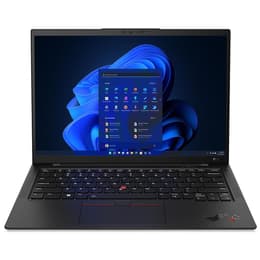
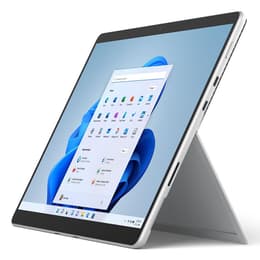
Lenovo ThinkPad X1 Carbon G10 14" vs Microsoft Surface Pro 8 13"

  • 1-year warranty
  • Free standard shipping
  • Free 30-day returns
Microsoft Surface Pro 8 13"
Starting at

Refurbished price:A$835.00

Versus A$3,192.00 new

See options

Differences at a glance

The Lenovo ThinkPad X1 Carbon G10 (2022) and the Microsoft Surface Pro 8 (2021) represent two distinct approaches to portable computing: a classic clamshell business laptop and a versatile detachable tablet. Both devices run on Windows 11 and offer robust capabilities for mobile productivity. While the ThinkPad focuses on a traditional laptop keyboard structure and expansive connectivity, the Surface Pro centers around a flexible tablet design with an optional detachable keyboard cover.

Available Models

Storage

Processor

Memory

Scores

Durability

When evaluating structural longevity and software support, both portable computers are designed to handle years of daily professional or academic use under standard conditions.

  • Software Support: Both devices receive regular operating system and security updates directly through Windows 11, ensuring long-term software compatibility.
  • Repairability and Build: The ThinkPad features a traditional service-friendly chassis design, whereas the Surface Pro uses a sealed tablet body that requires specialized care for internal component repairs.
  • Expected Lifespan: Both models maintain reliable battery health and processing output over several years, making a quality-assured refurbished option a sustainable choice for reducing electronic waste.

Release year

2022

2021

Last Os Compatibility

Yes

Yes

Operating system

Windows 11

Windows 11

Performance

Handling everyday office applications, intensive multitasking, and web browsing smoothly, both systems provide reliable speed across various configurations.

  • Multitasking and Responsiveness: Both devices manage heavy browser tabs, document editing, and background synchronization efficiently without noticeable slowdowns.
  • Storage and Memory: Available in multiple storage capacities and memory configurations, both systems support quick file access and responsive application launching.
  • Thermal and Battery Behavior: The ThinkPad's traditional laptop chassis manages sustained workloads effectively, while the Surface Pro's compact tablet form factor can generate more warmth during extended demanding tasks.

Graphic card

Integrated Graphics

Integrated Graphics

Screen quality

Display configurations vary significantly in form factor and viewing characteristics, catering to different visual preferences for media consumption and text clarity.

  • Display Technology and Aspect Ratio: The ThinkPad offers a traditional 14-inch display with a 16:10 aspect ratio, whereas the Surface Pro utilizes a 13-inch touch-enabled screen with a 3:2 aspect ratio.
  • Clarity and Refresh Rate: The Surface Pro supports an optional higher refresh rate for smoother scrolling, while the ThinkPad provides sharp text rendering across its available panel options.
  • Outdoor Usability: Both screens feature adequate maximum brightness levels and anti-glare properties to remain readable in brightly lit indoor environments or shaded outdoor spaces.

Resolution

1920 x 1080

2256 x 1504

Screen type

IPS

LED

Camera

Audiovisual

Media consumption and virtual communication features differ based on the form factor and integrated hardware components of each device.

  • Video Conferencing: Both models include clear front-facing camera systems and reliable microphone arrays that isolate voice input effectively during online meetings.
  • Rear Imaging: The Surface Pro features an additional rear-facing camera for quick document scanning, a feature omitted from the traditional clamshell laptop design of the ThinkPad.
  • Audio Output: Built-in stereo speakers on both devices deliver clear sound for video calls and casual media streaming, though external headphones or speakers provide deeper audio range.

Miscellaneous

Physical design, port selection, and accessory compatibility define how each device integrates into mobile workspaces and travel routines.

  • Port Selection: The ThinkPad includes a diverse array of built-in connections like standard USB ports and HDMI, whereas the Surface Pro relies primarily on versatile USB-C ports with Thunderbolt support alongside a proprietary charging connector.
  • Weight and Portability: The ThinkPad provides a lightweight clamshell structure with an integrated keyboard, while the Surface Pro functions as an ultra-portable tablet that requires a separate cover for traditional typing.
  • Input Methods: The ThinkPad features a renowned tactile mechanical keyboard and trackpoint, while the Surface Pro emphasizes touchscreen navigation and stylus support.

Weight

7500 oz

2500 oz

Screen size

14

13

What the community thinks

User feedback from online communities highlights distinct preferences for each device based on daily workflow requirements. Owners of the Lenovo ThinkPad X1 Carbon G10 frequently praise its comfortable keyboard, sturdy carbon-fiber build, and robust selection of traditional ports. Conversely, users of the Microsoft Surface Pro 8 often appreciate its lightweight tablet versatility, responsive touchscreen, and flexibility as a digital notebook. Common discussions note that the Surface Pro's detachable keyboard requires a stable surface for lap use, while the ThinkPad's fixed hinge design offers a more traditional laptop experience in any environment.

Users prioritizing traditional lap typing, extensive built-in ports, and a rigid structure will find the ThinkPad X1 Carbon well-suited to their needs. Meanwhile, users prioritizing maximum portability, touchscreen interaction, and a detachable tablet format may lean toward the Surface Pro 8. Choosing either model as a quality-assured refurbished option provides a practical and sustainable way to access reliable computing power while supporting eco-friendly consumer habits.


Our recent comparisons