
Compare models

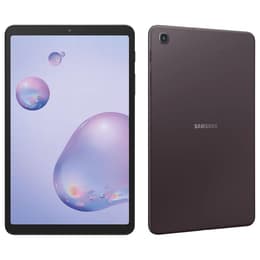
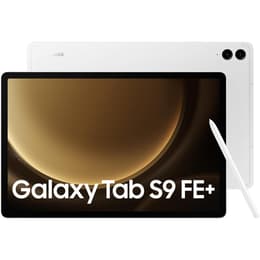
Galaxy Tab A (8.4", 2020) vs Galaxy Tab S9 FE+ (12.4", 2023)

  • 1-year warranty
  • Free standard shipping
  • Free 30-day returns

Differences at a glance

The Samsung Galaxy Tab A (8.4", 2020) and the Samsung Galaxy Tab S9 FE+ (12.4", 2023) represent very different eras, form factors, and tiers within Samsung's tablet lineup. While the Galaxy Tab A focuses on compact portability and straightforward daily utility, the Galaxy Tab S9 FE+ offers a much larger workspace, newer software, and expanded capabilities designed for modern productivity and multimedia. Both devices run the Android operating system paired with Samsung's custom interface, though they occupy entirely different segments of the market.

Scores

Durability

Evaluating the lifecycle and durability of these two tablets reveals significant differences driven by their release years and support timelines.

  • Release timeline and support: The Galaxy Tab A launched in 2020 with an older version of Android, whereas the Galaxy Tab S9 FE+ arrived in 2023 with a much more recent software foundation and eligibility for several years of major operating system updates.
  • Software longevity: Users relying on current app compatibility and security patches will find that the newer model provides an extended window of official software maintenance.
  • Build and repairability: Both tablets feature solid construction designed for everyday handling, but users seeking long-term operational readiness will notice that the newer hardware configuration handles modern system demands with greater longevity.

Release year

2020

2023

Compatible with latest Update

No

Yes

Operating system

Android

Android

Performance

Performance capabilities vary widely between these models, impacting how they handle daily tasks, apps, and multitasking.

  • Multitasking and memory: The Galaxy Tab S9 FE+ includes significantly more random access memory, allowing for smooth app switching and split-screen workflows, compared to the lighter memory configuration found in the older Galaxy Tab A.
  • System responsiveness: Everyday tasks such as web browsing and streaming run smoothly on both, but the newer processor in the larger tablet handles demanding applications and heavier multitasking with greater speed and reduced loading times.
  • Battery behavior: The Galaxy Tab S9 FE+ features a much larger battery capacity to support its expansive screen, delivering reliable endurance through full days of mixed usage, while the compact Galaxy Tab A relies on a smaller cell tailored for light, intermittent use.

Screen quality

Display characteristics define the primary physical interaction and viewing experience for each device.

  • Screen size and workspace: The Galaxy Tab S9 FE+ provides a spacious 12.4-inch display well-suited for document viewing and creative tasks, contrasting with the pocket-friendly 8.4-inch screen of the Galaxy Tab A.
  • Clarity and resolution: Both models deliver sharp text and clear visuals at their respective sizes, though the larger display offers higher overall resolution for detailed media consumption.
  • Viewing comfort: The newer display incorporates brighter output levels and smoother refresh rates, making it easier to view content outdoors or navigate interfaces fluidly compared to the standard refresh rate on the older model.

Resolution

1200 x 1920

1600 x 2560

Screen type

TFT LCD

IPS LCD

Pixel density

270ppp

250ppp

Audiovisual

Multimedia and capture capabilities reflect the functional priorities of each tablet design.

  • Camera hardware: The Galaxy Tab S9 FE+ is equipped with higher-resolution front and rear camera sensors, including dual rear lenses, while the Galaxy Tab A utilizes a basic single-lens setup suited mainly for quick snapshots or casual scanning.
  • Video and calls: Video conferencing quality benefits from the higher-resolution front-facing camera on the newer model, which captures clearer detail during virtual meetings.
  • Audio output: Speaker performance on the larger tablet delivers fuller sound for media consumption, whereas the compact model provides adequate audio for basic alerts and casual video viewing.

Miscellaneous

Physical design and connectivity features shape how these tablets integrate into daily routines.

  • Handling and dimensions: The Galaxy Tab A weighs roughly 309 grams and easily fits in small bags or one-handed grips, while the 628-gram Galaxy Tab S9 FE+ requires two-handed handling or a protective stand.
  • Connectivity standards: The newer model benefits from updated wireless standards and faster data transfer protocols via its USB-C port, whereas the older model features standard baseline connectivity and retains a traditional headphone jack.
  • Security and sensors: The Galaxy Tab S9 FE+ integrates a convenient fingerprint sensor for biometric unlocking, a feature omitted on the more basic Galaxy Tab A.

Weight

309 oz

627 oz

Screen size (in)

8.4

12.4

Network

Wi-Fi + 4G

Wi-Fi + 5G

Carrier compatibility

Unlocked

Unlocked

Connector

USB Type-C

USB Type-C

What the community thinks

User feedback from online communities highlights distinct preferences depending on individual daily habits. Owners of the Galaxy Tab A frequently praise its lightweight build, compact dimensions, and ease of portability for reading or casual media consumption on the go. However, some users note that its older software and limited memory struggle with modern applications. Conversely, users of the Galaxy Tab S9 FE+ appreciate the expansive screen estate, smooth interface interactions, and reliable battery life for productivity and entertainment, though some find its physical footprint heavy for single-handed holding.

Users prioritizing maximum portability, a smaller form factor, and simple media viewing will find the Galaxy Tab A well-suited to their needs. Meanwhile, users prioritizing a large workspace, robust multitasking, and modern software support may lean toward the Galaxy Tab S9 FE+. Exploring a quality-assured refurbished option can also provide a sustainable choice for acquiring these devices with verified functional reliability. Ultimately, the choice depends on balancing screen size preferences with processing and software longevity requirements.

Our recent comparisons