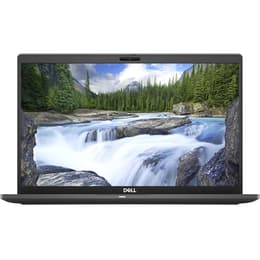
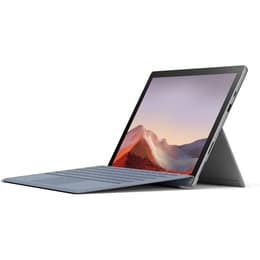

Dell Latitude 7410 14" vs Microsoft Surface Pro 7 12"

Dell Latitude 7410 14"
Starting at

Refurbished price:A$716.00

Versus A$839.00 new

See options
Microsoft Surface Pro 7 12"
Starting at

Refurbished price:A$398.00

Versus A$1,680.00 new

See options

The Dell Latitude 7410, released in 2020, is a business-oriented laptop, while the Microsoft Surface Pro 7, launched in late 2019, is a versatile 2-in-1 device. Both run on the Windows operating system, offering a familiar software environment. The primary distinction lies in their form factor: the Latitude 7410 is a traditional clamshell laptop, though a 2-in-1 convertible option exists, whereas the Surface Pro 7 is a tablet designed to function as a laptop with an attachable keyboard. This fundamental difference influences their portability, usability, and target user profiles.

Scores

Durability

The longevity of electronic devices is influenced by their release timeline, operating system support, and ease of repair. Both the Dell Latitude 7410 and the Microsoft Surface Pro 7, being Windows devices, benefit from Microsoft's extended software support for the operating system.

  • Release Timeline: The Microsoft Surface Pro 7 was released in October 2019, preceding the Dell Latitude 7410, which launched in mid-2020. This means the Latitude 7410 may receive official operating system updates for a slightly longer duration.
  • OS Support & Software Longevity: Both devices run Windows 10 (with upgrade paths to Windows 11), ensuring a consistent software experience and ongoing security updates from Microsoft for several years. Dell provides ongoing driver and software support for the Latitude 7410.
  • Repairability: The Dell Latitude 7410 is generally considered to have a more accessible design for internal repairs and component replacement, such as SSDs and batteries. Surface Pro devices, due to their compact and integrated design, are typically more challenging to repair, with components often soldered or difficult to access.

Release year

2020

2019

Last Os Compatibility

Yes

Yes

Operating system

Windows 11

Windows 11

Performance

Both the Dell Latitude 7410 and the Microsoft Surface Pro 7 are equipped with 10th-generation Intel processors, providing capable performance for everyday computing tasks. However, their form factors and cooling solutions can lead to differences in sustained performance and overall responsiveness.

  • Everyday Task Handling: Both devices handle common productivity applications, web browsing, and multimedia consumption smoothly. The 10th-generation Intel processors in both ensure efficient execution of daily workloads.
  • Multitasking and Responsiveness: The Latitude 7410 offers RAM configurations up to 32GB, which provides ample headroom for extensive multitasking. The Surface Pro 7 is available with up to 16GB of RAM. While both offer solid-state drive (SSD) storage for fast boot times and application loading, the Latitude's traditional laptop chassis may allow for more effective heat dissipation, potentially leading to more consistent performance during prolonged, demanding tasks.
  • Battery Behavior: The Dell Latitude 7410, particularly with its low-power display options, can offer extended battery life, with some configurations achieving over 10 hours of use in testing. The Surface Pro 7 typically provides around 8 to 10.5 hours of battery life, which can vary significantly with usage and settings.

Memory (GB)

16 GB

8 GB

Processor

Core i7 - Gen 10 (U)

Core i5 - Gen 10 (G4)

Graphic card

Intel UHD Graphics

Integrated Graphics

Screen quality

The display is a significant differentiator between these two devices, impacting visual clarity, viewing experience, and overall usability, especially given their distinct form factors.

  • Display Technology and Resolution: The Dell Latitude 7410 features a 14-inch display, with options ranging from Full HD (1920x1080) to 4K UHD (3840x2160) IPS panels. The Microsoft Surface Pro 7 has a 12.3-inch PixelSense display with a resolution of 2736 x 1824 pixels, resulting in a higher pixel density.
  • Clarity and Viewing Experience: The Surface Pro 7's higher resolution on a smaller screen provides a very sharp and detailed image, which is beneficial for text and fine details. The Latitude 7410's 4K option also offers exceptional clarity on a larger canvas. Both devices offer comfortable viewing angles.
  • Brightness and Aspect Ratio: The Latitude 7410's 4K display option can reach 400 nits of brightness. The Surface Pro 7's display is noted for being bright and vivid. The Surface Pro 7 features a 3:2 aspect ratio, which provides more vertical screen real estate, often preferred for productivity tasks like document editing and web browsing. The Latitude 7410 typically uses a 16:9 aspect ratio, common for laptops.

Resolution

1920 x 1080

1920 x 1280

Screen type

LCD

LED

Audiovisual

The camera and audio capabilities of these devices cater to different primary use cases, with the Surface Pro 7 emphasizing video conferencing and casual photography due to its tablet design.

  • Camera System Capabilities: The Microsoft Surface Pro 7 includes both a 5MP front-facing camera with 1080p HD video for video calls and an 8MP rear-facing camera with autofocus for casual photography. The Dell Latitude 7410 typically features a 720p HD webcam, primarily for video conferencing.
  • Video Recording Quality: The Surface Pro 7's cameras offer better resolution and detail for both front and rear video recording, making it more suitable for capturing moments or higher-quality video calls. The Latitude 7410's webcam is functional for standard video calls.
  • Microphone and Speaker Quality: The Surface Pro 7 features dual far-field Studio Mics, designed to capture clear audio during calls and voice commands. Both devices offer integrated speakers for media consumption and conferencing, with the Surface Pro 7 often noted for clear audio with Dolby Audio.

Miscellaneous

Beyond core performance and display, several practical elements contribute to the overall user experience, including connectivity, port selection, security features, and physical design.

  • Connectivity Options: The Dell Latitude 7410 supports Wi-Fi 6 (802.11ax) and Bluetooth 5.1, with optional LTE capabilities. The Microsoft Surface Pro 7 also features Wi-Fi 6 and Bluetooth 5.
  • Port Types: The Latitude 7410 offers a comprehensive selection, including two Thunderbolt 3 (USB-C) ports, two USB 3.2 Gen 1 Type-A ports, an HDMI 2.0 port, a universal audio jack, and a microSD card slot. The Surface Pro 7 includes one USB-C port, one USB-A port, a 3.5mm audio jack, a Surface Connect port, and a microSD card reader. The absence of Thunderbolt 3 on the Surface Pro 7 is a notable difference.
  • Weight and Dimensions: The Dell Latitude 7410, as a 14-inch laptop, weighs around 1.3 kg to 1.6 kg depending on configuration. The Surface Pro 7, as a tablet without its Type Cover, weighs approximately 0.77 kg to 0.79 kg, making it significantly lighter and more portable in tablet mode. With the Type Cover, its weight increases, but it remains a highly portable 2-in-1 solution.

Weight

1330 oz

775 oz

Screen size

14

12

The Dell Latitude 7410 and Microsoft Surface Pro 7 cater to distinct user needs, each excelling in different areas. User feedback for the Latitude 7410 often praises its robust build quality, comfortable keyboard, and strong battery life, especially with the 4K low-power display option. Some users note its weight as a minor drawback for a 14-inch laptop. The Surface Pro 7 is frequently lauded for its exceptional portability, high-resolution PixelSense display, and versatility as a tablet and laptop. Common criticisms sometimes point to its battery life being less consistent than some competitors and the bezels around the screen appearing somewhat dated.

Users prioritizing a traditional laptop experience with a strong emphasis on productivity, a wide array of ports, and potentially longer sustained performance for demanding tasks may find the Dell Latitude 7410 well-suited to their needs. Its larger screen and robust build are beneficial for extended work sessions. Conversely, individuals who value extreme portability, a high-resolution touch display for creative work or note-taking, and the flexibility of a 2-in-1 form factor will likely lean towards the Microsoft Surface Pro 7. Its tablet mode and pen support offer a different interaction paradigm. Both devices offer a reliable Windows experience, and considering a quality-assured refurbished option for either can be an eco-friendly alternative for consumers.

See all articles

Our recent comparisons