Dell Latitude 7200 2-in-1 12" vs HP EliteBook 840 G5 14"

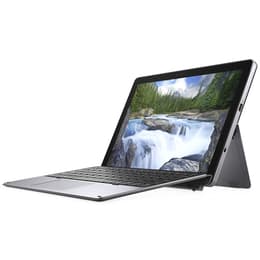
Dell Latitude 7200 2-in-1 12"
See options
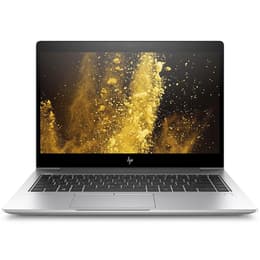
HP EliteBook 840 G5 14"
See options

The Dell Latitude 7200 2-in-1 (released in 2019) and the HP EliteBook 840 G5 14 (released in 2018) are business-oriented devices designed for productivity. The primary distinction lies in their form factor: the Latitude 7200 is a detachable 2-in-1 tablet with an optional keyboard, emphasizing portability and versatility, while the EliteBook 840 G5 is a traditional clamshell laptop, prioritizing a conventional computing experience. Both devices operate on the Windows platform.

Scores

Durability

When considering the longevity of these devices, their release timelines and operating system support are key factors. The Dell Latitude 7200 2-in-1 was released in 2019, making it slightly newer than the HP EliteBook 840 G5, which debuted in 2018. Both initially shipped with Windows 10.

  • Operating System Support: Windows 10 reached its end of support on October 14, 2025, meaning free security updates and technical assistance are no longer provided for most editions. While both devices are generally capable of running Windows 11, the HP EliteBook 840 G5, being an older model, might face more limitations or reduced long-term support for newer Windows 11 feature updates compared to the slightly newer Dell Latitude 7200 2-in-1.
  • Build Quality and Materials: Both laptops are built for business use, featuring robust construction. The Dell Latitude 7200 2-in-1 utilizes a combination of magnesium and aluminum for its chassis, offering good stability in its tablet form. The HP EliteBook 840 G5 features an aluminum body, contributing to a sturdy feel.
  • Repairability: Business-grade devices typically offer better repairability than many consumer models. While specific repairability scores can vary, both manufacturers generally design their business lines with some serviceability in mind, though RAM in the Dell Latitude 7200 2-in-1 is soldered and not upgradeable.

Release year

2019

2017

Last Os Compatibility

Yes

Yes

Operating system

Windows 11

Windows 11

Performance

The performance capabilities of these two devices are largely influenced by their internal components and how they handle typical workloads.

  • Processor and Multitasking: Both the Dell Latitude 7200 2-in-1 and the HP EliteBook 840 G5 typically feature 8th-generation Intel Core processors. This means they offer comparable processing power for everyday tasks such as web browsing, document editing, and managing multiple applications simultaneously. Users can expect smooth operation for general business and productivity software.
  • Memory and Storage: Both devices commonly come with 8GB or 16GB of RAM, with some configurations of the HP EliteBook 840 G5 offering up to 32GB. The Dell Latitude 7200 2-in-1's RAM is soldered, limiting future upgrades, while the EliteBook 840 G5 often has user-accessible slots for memory expansion. Both utilize fast SSD storage, contributing to quick boot times and responsive application loading.
  • Battery Behavior: The HP EliteBook 840 G5 generally includes a larger battery (50 Whr) compared to the Dell Latitude 7200 2-in-1 (38 Whr). User reports indicate the EliteBook 840 G5 can last an average workday, often around 8 hours with typical usage. The Latitude 7200 2-in-1, due to its smaller battery, may require more frequent charging, with some users reporting around 5 hours of use.

Memory (GB)

16 GB

8 GB

Processor

Core i5 - Gen 8 (U)

Core i7 - Gen 8 (U)

Graphic card

Integrated Graphics

Integrated Graphics

Screen quality

The visual experience on these devices differs primarily due to their form factor and display specifications.

  • Display Technology and Resolution: The Dell Latitude 7200 2-in-1 features a 12.3-inch IPS LCD touchscreen with a resolution of 1920x1280 pixels and a 3:2 aspect ratio. This aspect ratio is often preferred for productivity tasks as it offers more vertical screen space. The HP EliteBook 840 G5 typically comes with a 14-inch IPS display with a 1920x1080 resolution and a 16:9 aspect ratio.
  • Brightness and Clarity: The Latitude 7200 2-in-1's display offers good brightness, with some configurations reaching 400 nits, providing clear visibility in various indoor lighting conditions. The EliteBook 840 G5 offers various panel options, with some standard models having brightness around 220-305 nits, which can be dim for bright environments. However, higher-end configurations of the EliteBook 840 G5 can feature HP Sure View privacy screens with significantly higher brightness, up to 700 nits, improving outdoor visibility and offering privacy features.
  • Viewing Experience: The Dell's smaller, higher aspect ratio screen is well-suited for document work and web browsing, offering a compact and portable viewing experience. The HP's larger 14-inch screen provides more traditional laptop screen real estate, which can be beneficial for multitasking with multiple windows side-by-side, though the base model's color reproduction might be less vibrant.

Resolution

1920 x 1080

1920 x 1080

Screen type

LED

IPS

Camera

Audiovisual

The camera and audio capabilities of these business-focused devices are designed to support communication and media consumption.

  • Camera System: The Dell Latitude 7200 2-in-1, being a tablet-first design, includes both a front-facing 5-megapixel camera and a rear-facing 8-megapixel camera. Both cameras support 1080p video recording at 30 frames per second, making it suitable for video conferencing and occasional photo capture. The HP EliteBook 840 G5 typically features a front-facing 720p HD webcam, which is standard for video calls on laptops.
  • Microphone Quality: Both devices are equipped with integrated multi-array microphones, designed to enhance clarity during calls and recordings by reducing background noise. The HP EliteBook 840 G5 specifically highlights HP Noise Cancellation features and a world-facing third microphone in some configurations to improve conferencing experiences.
  • Speaker Output: Both laptops feature stereo speakers. The HP EliteBook 840 G5's speakers are tuned by Bang & Olufsen, aiming to provide rich sound for media consumption and clear audio for calls. The Dell Latitude 7200 2-in-1 also offers clear speaker output, with some users noting improved bass and crispness compared to previous models.

Miscellaneous

Beyond core performance and display, several practical elements differentiate these two business machines.

  • Connectivity Options: Both devices offer modern wireless connectivity, including Wi-Fi 802.11ac and Bluetooth. For wired connections, both include USB-C ports with Thunderbolt 3 support, enabling fast data transfer, power delivery, and external display connectivity. The Dell Latitude 7200 2-in-1 also has a USB-A port and a microSD card reader. The HP EliteBook 840 G5 provides a more comprehensive array of traditional ports, including two USB-A ports, HDMI, and an Ethernet port, catering to a wider range of peripherals and network connections without adapters.
  • Security Features: Both laptops integrate robust security features essential for business environments. These include fingerprint readers and IR cameras for facial recognition (Windows Hello). The HP EliteBook 840 G5 also emphasizes features like HP Sure Start for BIOS protection and HP Sure Click for web browsing security.
  • Portability and Build: The Dell Latitude 7200 2-in-1 is designed for maximum portability as a detachable tablet, weighing around 0.85 kg (1.9 lbs) for the tablet only, and features a built-in kickstand. Its dimensions are 292 x 208.8 x 9.3 mm. The HP EliteBook 840 G5 is a more traditional 14-inch laptop, starting at approximately 1.48 kg (3.27 lbs) for non-touch models, with dimensions of 32.6 x 23.4 x 1.79 cm. The EliteBook's aluminum chassis offers a sturdy feel, while the Latitude's magnesium and aluminum construction provides durability in its compact form.

Weight

851 oz

1500 oz

Screen size

12

14

The Dell Latitude 7200 2-in-1 and the HP EliteBook 840 G5 14 cater to distinct user needs within the business and productivity sphere. Users often praise the Latitude 7200 2-in-1 for its exceptional portability and the flexibility offered by its detachable 2-in-1 design, making it a strong contender for those who frequently transition between laptop and tablet modes. Its compact size and touch display with a productivity-friendly 3:2 aspect ratio are frequently highlighted as benefits for on-the-go work and presentations. Some users, however, note that its battery life might be a limitation for extended periods away from a power source, and the smaller screen size might not suit all multitasking preferences.

Conversely, the HP EliteBook 840 G5 is generally lauded for its robust build quality, comfortable keyboard, and a more comprehensive selection of traditional ports, which can be advantageous for desk-bound work or connecting various peripherals without additional adapters. Its larger 14-inch screen provides a more expansive viewing area, which is often preferred for extended work sessions. Criticisms sometimes point to the base model's display brightness being less than ideal in very bright environments, though higher-end configurations address this with brighter, privacy-enabled screens.

Users prioritizing maximum flexibility, a lightweight design, and tablet functionality for tasks like digital note-taking or presentations may find the Dell Latitude 7200 2-in-1 well-suited to their needs. Its compact form factor is ideal for frequent travelers or those with limited workspace. On the other hand, individuals who require a traditional laptop experience with a larger screen, extensive port selection, and potentially longer battery life for a full workday will likely lean towards the HP EliteBook 840 G5. It offers a solid foundation for demanding business applications and a more conventional desktop replacement experience.

Both devices represent reliable options for professional use, and choosing between them often comes down to the preferred form factor and specific connectivity requirements. For those considering these models, exploring quality-assured refurbished options can provide an eco-friendly alternative for acquiring a capable business device.
See all articles

Our recent comparisons