
Dell Latitude 7200 2-in-1 12" vs Dell Latitude 7490 14"

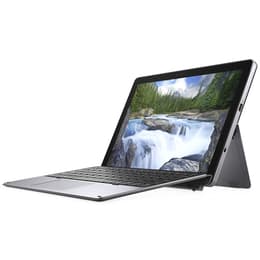
Dell Latitude 7200 2-in-1 12"
See options
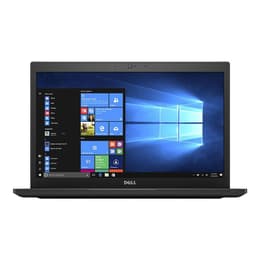
Dell Latitude 7490 14"
See options

The Dell Latitude 7200 2-in-1 12, released in 2019, and the Dell Latitude 7490 14, launched in 2018, are both business-oriented devices from Dell's Latitude series. While the 7200 2-in-1 offers a versatile detachable design, functioning as both a tablet and a laptop, the 7490 is a more traditional clamshell laptop. Both run on Windows and are designed for productivity, but their form factors and specific features cater to different user preferences and work styles.

Scores

Durability

When considering the longevity of these devices, both the Dell Latitude 7200 2-in-1 12 and the Dell Latitude 7490 14 offer solid foundations for extended use, though with slight differences in their design and support timelines.

  • Release Timeline: The Latitude 7490 was released in 2018, making it slightly older than the 7200 2-in-1, which debuted in 2019. Both devices are powered by 8th generation Intel processors, ensuring a similar baseline for software compatibility and performance for several years to come.
  • Software Support: As Windows-based machines, both models are eligible for upgrades to Windows 11, extending their functional lifespan through current operating system features and security updates. The practical lifespan for receiving major OS updates is generally similar for devices from this era.
  • Repairability: The Latitude 7490 is noted for its repairability, with many components like the battery, M.2 SSD, and RAM being replaceable. The 7200 2-in-1 also allows for component replacement, including the M.2 SSD and battery, though accessing internal components requires removing the display, which can be a more involved process.

Release year

2019

2017

Last Os Compatibility

Yes

Yes

Operating system

Windows 11

Windows 11

Performance

Both the Dell Latitude 7200 2-in-1 12 and the Dell Latitude 7490 14 are equipped to handle typical business and productivity tasks, offering responsive performance for everyday computing.

  • Processor Capabilities: Both devices feature 8th generation Intel processors, providing sufficient power for multitasking, running office applications, and web browsing. Users can expect smooth operation for demanding apps and efficient handling of multiple programs simultaneously.
  • Memory and Storage: The Latitude 7490 typically supports up to 32GB of DDR4 RAM, with some configurations allowing for up to 64GB, offering ample headroom for extensive multitasking. The 7200 2-in-1 comes with up to 16GB of LPDDR3 RAM, which is generally soldered, limiting future upgrades. Both models utilize fast NVMe SSDs for quick boot times and rapid application loading.
  • Battery Behavior: The Latitude 7490, with its larger battery options (up to 68Wh), generally offers longer battery life, with users reporting 6 to 7.5 hours of moderate use and some even achieving up to 15 hours with specific configurations. The 7200 2-in-1, featuring a 38Whr battery, tends to have a shorter battery life, often requiring charging before the end of a full workday, particularly with continuous use.

Memory (GB)

16 GB

16 GB

Processor

Core i5 - Gen 8 (U)

Core i7 - Gen 8 (U)

Graphic card

Integrated Graphics

Integrated Graphics

Screen quality

The visual experience on these two Dell Latitude models differs primarily due to their form factor and display specifications.

  • Display Technology and Resolution: The Latitude 7200 2-in-1 features a 12.3-inch Full HD (1920 x 1280) IPS touch display with a 3:2 aspect ratio, providing more vertical screen real estate, which can be beneficial for document work and web browsing. The Latitude 7490 offers a 14-inch display, with options for HD (1366x768) or Full HD (1920x1080) IPS panels, often with an anti-glare finish.
  • Brightness and Clarity: Both devices offer clear visuals suitable for productivity. The 7200 2-in-1's glossy screen can offer vibrant colors, while the 7490's anti-glare options are designed to reduce reflections, improving visibility in varied lighting conditions.
  • Viewing Experience: The 7200 2-in-1's detachable design and touch functionality make it adaptable for presentations or note-taking in tablet mode. The 7490, as a traditional laptop, provides a stable viewing platform for extended typing and desktop-like usage.

Resolution

1920 x 1080

1366 x 768

Screen type

LED

IPS

Camera

Audiovisual

For communication and media consumption, both Latitude models include essential audiovisual components, though with varying capabilities.

  • Camera System: The Latitude 7200 2-in-1 is equipped with a 5MP front-facing camera capable of 1080p video and an 8MP rear-facing camera, offering higher resolution for both video conferencing and occasional photography. The Latitude 7490 includes a 720p HD webcam, which is standard for video calls and online meetings.
  • Microphone and Speakers: Both devices feature integrated microphones suitable for calls and stereo speakers for media playback. The audio experience is generally optimized for clear voice communication and casual listening.
  • Media Consumption: The 7200 2-in-1's 3:2 aspect ratio display can be advantageous for viewing documents and web pages, while the 7490's larger 14-inch screen provides a more expansive viewing area for videos and presentations in a traditional laptop format.

Miscellaneous

Beyond core performance, several practical elements differentiate the user experience between these two Dell Latitude models.

  • Connectivity Options: The Latitude 7200 2-in-1 features two Thunderbolt 3 (USB-C) ports, offering high-speed data transfer, video output, and charging capabilities, alongside a USB 3.1 Gen 1 Type-A port. The Latitude 7490 provides a broader range of legacy ports, including multiple USB 3.1 Gen 1 Type-A ports, HDMI, RJ-45 Ethernet, and a USB Type-C port (with optional Thunderbolt 3). Both support Wi-Fi 802.11ac and Bluetooth.
  • Portability and Build: The 7200 2-in-1 is designed for maximum portability, with the tablet weighing around 0.85 kg, making it lighter and more compact for on-the-go use. Its chassis is constructed from aluminum and magnesium for durability. The 7490, a traditional laptop, starts at approximately 1.4 kg, offering a larger screen and a robust magnesium alloy, aluminum, or carbon fiber build.
  • Security Features: Both models offer enterprise-grade security features, including optional fingerprint readers and IR cameras for facial recognition with Windows Hello.

Weight

851 oz

2500 oz

Screen size

12

14

Choosing between the Dell Latitude 7200 2-in-1 12 and the Dell Latitude 7490 14 depends largely on individual priorities regarding form factor, portability, and specific connectivity needs. Users frequently praise the Latitude 7490 for its robust build quality, comfortable keyboard, and generally good battery life, making it a reliable workhorse for traditional laptop users. However, some users have reported concerns regarding potential overheating under heavy loads and, in some instances, battery swelling.

The Latitude 7200 2-in-1 is often lauded for its versatile detachable design, offering the flexibility of a tablet with the functionality of a laptop, and its modern port selection including Thunderbolt 3. On the other hand, its battery life is a more frequent point of criticism, with some users finding it insufficient for a full day of heavy use. The keyboard, while functional, may not offer the same stability as a traditional laptop.

Users prioritizing a highly portable and adaptable device for presentations, note-taking, and light-to-moderate productivity, who value a modern port selection, may find the Latitude 7200 2-in-1 well-suited to their needs. Conversely, those who require a larger screen, a more traditional and stable typing experience, and longer battery life for sustained work sessions might lean towards the Latitude 7490. Both devices represent solid choices for business and academic environments, and opting for a quality-assured refurbished option can provide an eco-friendly alternative for either model.
See all articles

Our recent comparisons