Compare models
Lenovo ThinkPad X1 Yoga G4 14" vs Microsoft Surface Pro 8 13"
- 1-year warranty
- Free standard shipping
- Free 30-day returns
Differences at a glance
The Lenovo ThinkPad X1 Yoga G4 (2019) and the Microsoft Surface Pro 8 (2021) are versatile portable computers designed for professionals, students, and travelers who need flexible computing formats. While both machines run on the Windows operating system and feature touchscreens that adapt to various working styles, they approach portability and design through fundamentally different hardware layouts.
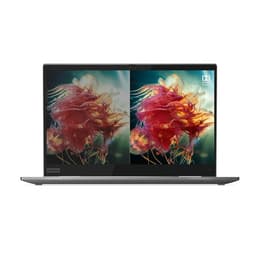
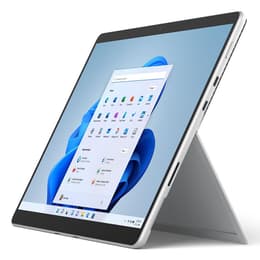
The Lenovo model functions as a traditional 360-degree convertible laptop with an integrated keyboard, whereas the Microsoft device uses a detachable tablet form factor supported by a kickstand and a removable keyboard cover.
Available Models
Storage
Processor
Memory
Scores
Durability
Evaluating the lifespan and durability of these devices involves looking at their release timelines, software update support, and general hardware construction standards.
- Software support timeline: The Microsoft device benefits from a newer release year, allowing it to receive operating system updates and security patches for a longer duration compared to its competitor.
- Hardware construction: Both options feature sturdy metal chassis engineered to withstand regular daily travel, though integrated keyboard hinges on convertibles experience different wear patterns than detachable magnetic connectors.
- Repairability and maintenance: Component replacement requires professional assistance for both models due to their thin profiles, making careful handling essential for long-term reliability.
Release year
2019
2021
Last Os Compatibility
Yes
Yes
Operating system
Windows 11
Windows 11
Performance
Daily responsiveness and multitasking capabilities vary based on internal hardware generations and thermal management designs.
- Everyday multitasking: Both devices handle web browsing, office applications, and video conferencing smoothly, though newer processor generations in the Microsoft model offer slight efficiency advantages during heavy workloads.
- Storage and memory: Configurations vary across retail versions, with options supporting rapid file access and sufficient memory for running multiple demanding applications simultaneously.
- Battery behavior: Battery endurance varies with screen brightness and workload intensity, typically requiring a midday charge during intensive multi-app usage sessions.
Graphic card
Integrated Graphics
Integrated Graphics
Screen quality
Visual workspace experiences differ due to distinct screen dimensions, panel technologies, and aspect ratios tailored for productivity.
- Display panels: Both units utilize bright, high-resolution touchscreens that render sharp text and vivid images for document editing and media viewing.
- Refresh rate and smoothness: The Microsoft device incorporates a high refresh rate option that makes scrolling and pen input appear noticeably more fluid, while the Lenovo unit provides a standard refresh rate suited for traditional tasks.
- Aspect ratio and workspace: Taller screen proportions on both models maximize vertical viewing space, reducing the need for excessive scrolling during document review and web browsing.
Resolution
1920 x 1080
2256 x 1504
Audiovisual
Media consumption and communication features are integrated to support virtual meetings and multimedia use.
- Video call hardware: Front-facing camera systems provide clear image quality for online conferences, accompanied by reliable microphone arrays that capture clear voice audio.
- Speaker output: Built-in audio speakers deliver balanced sound for casual video playback and calls, though external headphones remain recommended for immersive listening.
- Rear documentation cameras: The detachable Microsoft device includes a rear-facing camera suitable for quick snapshots of documents, a feature omitted on the convertible laptop design.
Miscellaneous
Practical daily usability is shaped by physical dimensions, port availability, and peripheral ecosystem support.
- Port selection: Both computers utilize modern connection ports for high-speed data transfer and external monitor pairing, reducing reliance on bulky adapters.
- Input accessories: The Lenovo includes a built-in garaged stylus for precise note-taking, whereas the Microsoft device offers an optional detachable keyboard and slim pen combination.
- Weight and handling: The lighter detachable tablet design appeals to frequent travelers seeking minimal bag weight, while the heavier convertible offers a rigid one-piece lap-use experience.
Weight
1348 oz
2500 oz
Screen size
14
13
What the community thinks
User discussions and community feedback highlight distinct preferences for each device based on working styles. Owners of the Lenovo ThinkPad X1 Yoga G4 frequently praise its comfortable typing keyboard and integrated pen storage, though some note that older processor configurations run warmer under heavy loads. Conversely, Microsoft Surface Pro 8 users appreciate the fluid screen refresh rate and flexible tablet mode, while mentioning that using the device on a lap requires adjusting to the kickstand footprint.
Users prioritizing a traditional laptop experience with an attached keyboard and built-in stylus garage may prefer the Lenovo ThinkPad X1 Yoga G4. Meanwhile, users prioritizing a lightweight tablet format with enhanced screen fluidity and a detachable keyboard will find the Microsoft Surface Pro 8 well-suited to their needs. Choosing a quality-assured refurbished option provides an eco-friendly way to acquire either of these capable productivity machines while supporting sustainable technology consumption.