Compare models
HP EliteBook 840 G8 14" vs Microsoft Surface Pro 8 13"
- 1-year warranty
- Free standard shipping
- Free 30-day returns
Differences at a glance
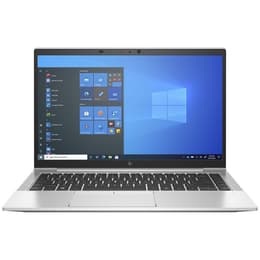
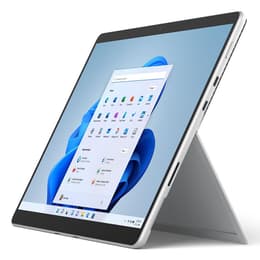
The HP EliteBook 840 G8 (2021) and Microsoft Surface Pro 8 (2021) are portable computing devices designed for professional users, students, and frequent travelers. While the HP EliteBook 840 G8 takes the form of a traditional clamshell laptop, the Microsoft Surface Pro 8 functions as a versatile 2-in-1 detachable tablet with a built-in kickstand. Both run on the Windows operating system and share similar internal processing platforms, yet they approach daily productivity through entirely distinct physical form factors.
Available Models
Storage (GB)
Processor
Memory (GB)
Scores
Durability
Both devices launched in the same year and share comparable software support cycles under the Windows operating system, though physical design differences impact their long-term maintenance potential.
- Support longevity: Both machines receive regular system updates and security patches directly from Microsoft, ensuring consistent software compatibility for standard enterprise and personal use.
- Repairability: The traditional laptop build features standard screw-based access and modular components, whereas the detachable tablet design relies heavily on adhesive seals, making component replacement more complex.
- Practical lifespan: Solid build materials and durable chassis construction mean both options maintain dependable structural integrity through years of mobile use.
Release year
2020
2021
Last Os Compatibility
Yes
Yes
Operating system
Windows 11
Windows 11
Performance
Equipped with similar core internal hardware generations, these devices handle everyday multitasking, document editing, and web browsing with comparable efficiency.
- System responsiveness: Applications open swiftly and multitasking remains fluid across multiple open browser windows and productivity tools thanks to efficient current-generation processing platforms.
- Thermal and battery behavior: The laptop configuration maintains steady performance during extended tasks, while the compact tablet layout manages heat within a thinner chassis during heavier workloads.
- Memory and storage: Various configurations accommodate different storage needs, with solid-state drives ensuring fast file access speeds and quick system boot times.
Graphic card
Integrated Graphics
Integrated Graphics
Screen quality
The visual experience differs significantly due to distinct display dimensions, aspect ratios, and panel technologies built into each chassis.
- Display technology: The laptop utilizes a traditional anti-glare screen suited for indoor and office environments, while the tablet features a glossy multi-touch panel with vibrant color reproduction.
- Resolution and refresh rate: The detachable tablet offers a higher pixel density and an optional higher refresh rate for smoother scrolling, whereas the laptop provides standard full high-definition clarity.
- Form factor interaction: The tablet display supports active stylus input directly on the screen, while the laptop relies on a conventional non-touch or optional touch panel paired with a physical keyboard.
Resolution
1920 x 1080
2256 x 1504
Screen type
IPS
LED
Camera
Audiovisual
Media consumption and communication capabilities are tailored to different working styles, particularly regarding video calls and audio output.
- Video conferencing: Both models include high-definition front-facing cameras equipped with facial recognition sensors for secure login, alongside clear microphone arrays for virtual meetings.
- Rear imaging: The tablet incorporates a higher-resolution rear camera for capturing documents or surroundings, a feature omitted on the traditional clamshell laptop design.
- Audio output: Built-in stereo speakers deliver clear sound for conference calls and media streaming, though external headphones or speakers improve depth for music playback.
Miscellaneous
Physical design choices dictate how each device connects to accessories, handles daily transport, and fits into mobile workflows.
- Port selection: The laptop includes traditional USB ports alongside modern connections, while the tablet relies primarily on versatile high-speed USB-C ports and a proprietary magnetic charging connector.
- Portability and weight: The lightweight detachable tablet offers maximum convenience for travelers and note-taking, whereas the laptop provides a stable, lap-friendly typing base.
- Build and durability: Both utilize sturdy metal chassis designs built to withstand regular travel, with the laptop featuring a spill-resistant keyboard for added protection.
Weight
2500 oz
2500 oz
Screen size
14
13
What the community thinks
Users evaluating these devices often highlight the HP EliteBook 840 G8 for its comfortable keyboard, extensive port selection, and stable lap usability, making it a reliable choice for traditional office tasks and extended typing sessions. On the other hand, users frequently praise the Microsoft Surface Pro 8 for its lightweight portability, detachable keyboard flexibility, and responsive touchscreen, though some note that using it on a lap requires careful adjustment of the kickstand.
Users prioritizing a classic laptop experience with robust physical connectivity may prefer the HP model, while users who value a highly portable touchscreen tablet for digital sketching and travel may lean toward the Microsoft alternative. Exploring a quality-assured refurbished option provides an eco-friendly way to access either of these capable professional devices while supporting more sustainable technology consumption choices.