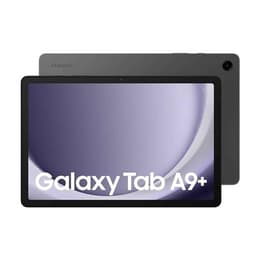
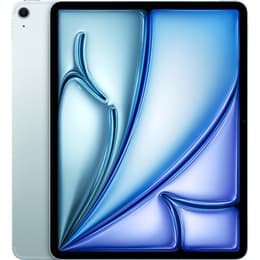

Galaxy Tab A9+ (11.0", 2023) vs iPad Air 6 (2024, M2 series)

Galaxy Tab A9+ (11.0", 2023)
See options
iPad Air 6 (2024, M2 series)
Starting at

Refurbished price:A$980.00

Versus A$1,779.00 new

See options

The Samsung Galaxy Tab A9+ (2023) and the Apple iPad Air (2024) represent distinct approaches to the tablet experience, catering to different user ecosystems and priorities. While the Galaxy Tab A9+ operates on Android, offering a versatile and open platform, the iPad Air runs on Apple's iPadOS, known for its streamlined interface and robust app ecosystem. These devices differ significantly in their core processing power, display technology, and overall software longevity, influencing their suitability for various tasks and user preferences.

Scores

Durability

The longevity of a tablet is significantly influenced by its release timeline and the manufacturer's commitment to software updates.

  • Release Timeline: The Galaxy Tab A9+ was released in October 2023, while the iPad Air (M2) launched in May 2024. This difference means the iPad Air begins its lifecycle with a slight advantage in terms of future software support.
  • OS Support Duration: Samsung typically provides 3 major Android OS upgrades and 4 to 5 years of security patches for the Galaxy Tab A9+. The iPad Air, on the other hand, generally receives iPadOS updates for approximately 5 to 7 years, with security updates often extending beyond that period, potentially offering a longer practical lifespan for software compatibility.
  • Expected Practical Lifespan: Users prioritizing the longest possible software support and access to the latest features may find the iPad Air offers a more extended period of optimal functionality. Both devices are built to last physically, but software support dictates how long they can effectively run modern applications and maintain security.

Release year

2023

2024

Compatible with latest Update

Yes

Yes

Operating system

Android

iPadOS

Performance

Performance is a key differentiator, impacting how smoothly applications run and how efficiently the tablet handles demanding tasks.

  • Storage Options: The Galaxy Tab A9+ is available with 64GB or 128GB of internal storage, with the added benefit of expandable storage via a microSD card up to 1TB. The iPad Air (M2) offers more generous base storage starting at 128GB, with configurations up to 1TB, but without the option for expandable storage.
  • Battery Behavior: The Galaxy Tab A9+ features a 7040 mAh battery, providing around 7 to 10 hours of usage depending on the task, with 15W wired charging. The iPad Air (M2) is rated for up to 10 hours of web browsing or video playback on a single charge. Both devices offer sufficient battery life for a full day of moderate use, though heavy usage may require more frequent charging.
  • Processor Capabilities: The iPad Air (M2) incorporates a powerful current-generation processor that enables smooth operation for demanding creative applications, advanced multitasking, and high-fidelity gaming without noticeable lag. The Galaxy Tab A9+ handles everyday tasks, web browsing, streaming, and light multitasking efficiently, with users noting that the 8GB RAM variant provides a smoother experience for bouncing between apps.

Memory (GB)

4 GB

8 GB

Screen quality

The visual experience on a tablet is largely defined by its display, with both devices offering distinct characteristics.

  • Display Technology: Both tablets feature LCD panels. The Galaxy Tab A9+ uses an 11-inch LCD, while the iPad Air (M2) features a 10.86-inch Liquid Retina IPS LCD display. The Liquid Retina display on the iPad Air is known for its color accuracy and wide color support.
  • Resolution and Clarity: The Galaxy Tab A9+ has a resolution of 1920 x 1200 pixels. The iPad Air (M2) offers a higher resolution of 2360 x 1640 pixels, resulting in a sharper image with more detail.
  • Brightness Levels: The iPad Air (M2) provides a typical brightness of 500 nits, which contributes to better visibility in various lighting conditions. While the Galaxy Tab A9+'s brightness is not explicitly stated in all sources, it is generally suitable for indoor use, though it may struggle more in direct sunlight.
  • Refresh Rate and Smoothness: The Galaxy Tab A9+ features a 90Hz refresh rate, which provides a smoother scrolling experience and more fluid animations compared to standard 60Hz displays. The iPad Air (M2) maintains a 60Hz refresh rate, which is standard but may feel less fluid to users accustomed to higher refresh rate screens.

Resolution

1200 x 1920

2360 x 1640

Screen type

TFT LCD

Liquid Retina display

Pixel density

210ppp

264ppp

Audiovisual

Tablet cameras are generally designed for casual use, video calls, and document scanning rather than professional photography, and these two devices reflect that.

  • Camera System Capabilities: The Galaxy Tab A9+ includes an 8MP rear camera and a 5MP front camera. The iPad Air (M2) features a 12MP Wide rear camera and a 12MP Ultra Wide front camera, with the front camera positioned for landscape use, which is beneficial for video conferencing.
  • Low-light and Everyday Photography: Reviews indicate that the Galaxy Tab A9+'s cameras are functional for well-lit scenarios and scanning documents, but low-light performance is mediocre with noticeable noise. The iPad Air's cameras generally offer better image quality and video capabilities, including 4K video recording on the rear camera and Center Stage for the front camera, which keeps subjects in frame during video calls.
  • Microphone and Speaker Quality: The Galaxy Tab A9+ features quad stereo speakers with Dolby Atmos support, providing an immersive audio experience. The iPad Air (M2) also has stereo speakers and dual microphones, offering clear audio for media consumption and calls.

Miscellaneous

Beyond core specifications, several practical elements contribute to the overall user experience and device utility.

  • Connectivity Options: The Galaxy Tab A9+ supports Wi-Fi 5 and Bluetooth 5.1, with optional 5G connectivity. The iPad Air (M2) offers more advanced connectivity with Wi-Fi 6E and Bluetooth 5.3, along with optional 5G.
  • Port Types: Both tablets utilize a USB-C port for charging and data transfer. The iPad Air's USB-C port supports USB 3 (up to 10 Gb/s) and DisplayPort, offering faster data transfer speeds and external display capabilities. The Galaxy Tab A9+ also has a 3.5mm headphone jack, which is absent on the iPad Air.
  • Useful Sensors: The Galaxy Tab A9+ relies on facial recognition for unlocking, lacking a fingerprint sensor. The iPad Air (M2) integrates Touch ID into its top button for secure authentication.
  • Weight and Dimensions: The Galaxy Tab A9+ weighs around 480g (Wi-Fi model) and measures 6.9mm thick. The 11-inch iPad Air (M2) weighs approximately 462g and is 6.1mm thick. Both are relatively thin and light, making them portable for daily use.
  • Build Materials: The Galaxy Tab A9+ features a smooth metal body, while the iPad Air (M2) has an aluminum back and frame.

Weight

480 oz

462 oz

Width

25,71 in

17.8 in

Height

16,87 in

24 in

Depth

0,69 in

0.61 in

Screen size (in)

11.0

11

Network

Wi-Fi + 5G

Wi-Fi + 5G

Carrier compatibility

Unlocked

Unlocked

User feedback for the Galaxy Tab A9+ often highlights its value for media consumption, web browsing, and light productivity, especially praising its 90Hz display and expandable storage. Some users note that the 4GB RAM model can struggle with multitasking, recommending the 8GB variant for smoother performance. Criticisms sometimes point to its modest charging speed and camera performance in low light.

The iPad Air (M2) receives praise for its powerful performance, robust app ecosystem, and high-quality Liquid Retina display. Users appreciate its capability for demanding tasks like video editing and advanced creative work. Common observations include the 60Hz refresh rate feeling less fluid compared to higher refresh rate screens and the absence of Face ID, relying instead on Touch ID.

Users prioritizing an open ecosystem, expandable storage, and a smoother scrolling experience for everyday tasks may find the Galaxy Tab A9+ well-suited to their needs. Its 90Hz display offers a noticeable fluidity for general use. Conversely, users who require top-tier performance for creative applications, a more extensive app library, and a longer software support window will likely lean towards the iPad Air (M2). Its powerful processor and refined iPadOS experience make it a strong contender for those seeking a premium tablet experience.

For those considering either device, exploring quality-assured refurbished options can be an eco-friendly alternative to purchasing new, offering a sustainable choice without compromising on functionality.


See all articles

Our recent comparisons