Compare models

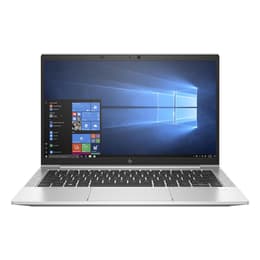
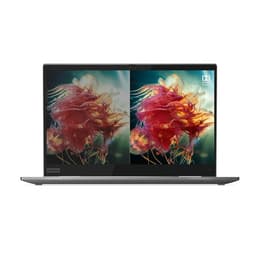
HP EliteBook 830 G7 13" vs Lenovo ThinkPad X1 Yoga G4 14"

  • 1-year warranty
  • Free standard shipping
  • Free 30-day returns

Differences at a glance

The HP EliteBook 830 G7 (2020) and the Lenovo ThinkPad X1 Yoga Gen 4 (2019) represent two well-established lines of business laptops designed for professional mobility. While the HP model offers a traditional clamshell form factor in a compact 13-inch build, the Lenovo alternative introduces a versatile 360-degree hinge and a slightly larger 14-inch screen. Both machines operate on Windows and cater to productivity-focused users, yet they differ significantly in their physical versatility and overall design approach.

Scores

Durability

When evaluating long-term utility, both corporate-grade laptops offer robust build quality designed to handle years of daily travel and office use, though their release timelines and repair frameworks differ slightly.

  • Software support: Both machines receive regular security patches and platform updates through standard Windows lifecycles, with the slightly newer HP model extending hardware support timelines by roughly one year.
  • Repairability and build: The HP EliteBook features a traditional modular layout with accessible internal components, whereas the Lenovo ThinkPad relies on a slim aluminum chassis with soldered components that limit major hardware modifications.
  • Expected lifespan: Both units provide dependable multi-year operational longevity for standard office workloads when properly maintained.

Release year

2019

2019

Last Os Compatibility

Yes

Yes

Operating system

Windows 11

Windows 11

Performance

Handling daily productivity tasks, multitasking, and standard office applications smoothly, both laptops utilize efficient multi-core processing architecture paired with responsive solid-state storage options.

  • Multitasking capacity: Configurations featuring generous memory allocations allow users to juggle dozens of browser tabs, document editors, and communication apps simultaneously without noticeable system stutter.
  • Everyday responsiveness: Web browsing, document drafting, and application loading happen swiftly thanks to fast internal storage speeds and efficient thermal management.
  • Battery behavior: Typical office workflows yield solid battery longevity that comfortably covers standard commuting hours, though intensive processing tasks will deplete the charge more rapidly.

Graphic card

Integrated Graphics

Integrated Graphics

Screen quality

Display configurations vary between the two devices, impacting how text clarity, brightness, and overall visual workspace size are experienced during daily tasks.

  • Display technology: The HP EliteBook utilizes a standard 13.3-inch IPS panel focused on clear text rendering, while the Lenovo ThinkPad offers a 14-inch touch-enabled surface with flexible viewing angles enabled by its convertible hinge.
  • Outdoor usability: Standard brightness panels manage indoor office lighting effectively, though high-glare environments benefit significantly from upgraded panel configurations offering increased luminance.
  • Workspace dimensions: The slightly larger screen real estate on the Lenovo model provides more room for side-by-side window multitasking, whereas the HP model prioritizes a more compact footprint.

Resolution

1920 x 1080

1920 x 1080

Audiovisual

Media consumption and remote collaboration capabilities are well-supported on both laptops through integrated microphone arrays and standard webcam hardware.

  • Video conferencing: Standard high-definition webcams paired with multi-directional microphone arrays deliver clear audio and video quality for routine virtual meetings and video calls.
  • Speaker output: Integrated stereo speaker systems provide clear dialogue for voice calls and casual media streaming, though external headphones remain preferable for immersive listening.
  • Optics and recording: Neither device focuses on advanced creative content capture, but both handle routine document scanning and video communication adequately.

Miscellaneous

Practical usability factors such as port selection, physical security features, and overall weight influence how easily each device transitions between different workspaces.

  • Connectivity and ports: Both models include versatile USB-Type-C connections alongside traditional USB ports and video outputs, facilitating straightforward accessory hookups.
  • Security integration: Enterprise-grade security tools, including fingerprint readers and privacy shutters for the webcam, come standard on both chassis designs.
  • Dimensions and handling: Weighing very close to each other at around 1.3 to 1.4 kilograms, both laptops slip easily into backpacks for daily transit.

Weight

1240 oz

1348 oz

Screen size

13

14

What the community thinks

User discussions across community forums frequently praise the HP EliteBook 830 G7 for its comfortable keyboard layout, reliable day-to-day performance, and sturdy corporate build. Common criticisms often note that base display configurations can feel limited in bright sunlight, and sustained heavy workloads can trigger audible fan noise. Conversely, owners of the Lenovo ThinkPad X1 Yoga Gen 4 highlight its exceptional 360-degree hinge flexibility, included stylus pen, and premium chassis feel as major daily advantages. Frequent complaints for the Lenovo model focus on non-upgradable soldered memory and a slightly heavier weight footprint compared to dedicated ultra-thin clamshells.

Users prioritizing a traditional clamshell laptop with straightforward hardware modularity may prefer the HP EliteBook, while users who value a convertible tablet mode and integrated stylus functionality often lean toward the Lenovo ThinkPad. For those exploring a quality-assured refurbished option, both models represent sustainable choices that reduce electronic waste without sacrificing core professional performance.

Our recent comparisons